
Welcome to the new iris.ma

We rebuilt everything for you

Same team, same standards

Pay nowView my order

Which ink ribbon fits the Epson LQ-2090?

Dot matrix · machine reference C11C559012

The LQ-2090 takes a black ribbon cassette, part number C13S015336BA, which also suits the LQ-2090II and LQ-2090IIN. Its yield is stated not in pages but in 8 million characters, measured in letter quality. The cassette is replaced with no adjustment, and the ink stays evenly spread to the end of the ribbon.

Compatible printer ribbons

See all
  • NoirRuban encreur
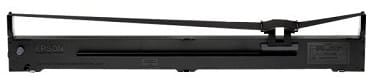
    Ruban noir Epson LQ-2090 (C13S015336BA)

    Epson

    Ruban noir Epson LQ-2090 (C13S015336BA)

    Convient aussi aux LQ-2090II et LQ-2090IIN. La cassette se remplace sans réglage et l'encre reste répartie uniformément jusqu'au bout du ruban.

    In stock

    225 DHincl. VAT

    Delivery everywhereDelivered all over Morocco

1 reference available · we confirm availability before dispatch and tell you straight away if we cannot fulfil it.

Eight million characters — how many documents is that?

The unit is disconcerting, but it is fairer than the page: on an impact printer it is the number of strikes that wears the ribbon, not the number of sheets that pass through it. A half-filled delivery note and a page of dense text do not cost the same.

To convert, count what you actually print. An A4 page of dense text runs to around 2,500 to 3,000 characters: the ribbon then covers something like 3,000 pages. A delivery note or an invoice on a pre-printed form, where only the variable fields are struck, often falls below 600 characters: the same cassette then lasts more than 10,000 documents.

That is why two businesses using the same machine can order a ribbon every month for one and once a year for the other, without either being wrong.

The ribbon wears out, the head is counted differently

The LQ-2090's printhead is rated for 400 million strikes per pin. It is the part that lasts, and it is what justifies keeping this kind of machine for years: it outlives dozens of ribbons.

The ribbon is the only routine supply. It does not "empty" like a cartridge: it fades gradually. When the print goes pale with no light coming on, that is the sign it has to be changed — and the replacement is done by hand, with no tools.

What the LQ-2090 prints that nothing else does

This machine takes continuous paper, multipart sets and labels. The strike goes through the sheets of a set in a single pass: precisely what a laser or an inkjet cannot do, and the reason three-part delivery notes still come out of dot matrix printers.

If you are looking instead for a machine for ordinary documents, our consumables page groups the catalogue's printers by brand and by technology.

Frequently asked questions

Does this ribbon also suit an LQ-2090II?
Yes. The C13S015336BA cassette covers the LQ-2090 as well as the LQ-2090II and LQ-2090IIN. It is the same part number for all three models, with no adaptation and no particular adjustment when fitting.
Can a ribbon be re-inked instead of replaced?
It is not provided for by the manufacturer and we do not advise it: an unsuitable ink hardens the weave of the ribbon and ends up damaging the pins in the head, a far costlier part than the cassette. The genuine cassette remains the safest answer.
The print is fading although the ribbon is new: what should I do?
First check the head gap setting, designed to adapt to the thickness of multipart sets: set too wide for plain paper, it makes the print pale with no fault in the ribbon. Then check that the cassette is properly clipped in and the ribbon correctly tensioned.

Other Epson Séries matricielles

A fleet of printers to keep supplied?

We draw up the list of consumables for your whole fleet and a single grouped quote. Invoice in your company's name with its ICE number, delivery anywhere in Morocco.

Looking for another machine? Search by model or by cartridge reference. To understand page yields and cost per page, read our toner and cartridge guide.

Chat on WhatsApp

Scan with my phone

The simplest way: open your phone camera and point it at this code. The chat opens with your message ready.

Open WhatsApp Web

Works if your phone is already linked to this computer.

Prefer to call? (+212) 05 30 31 64 21