Welcome to the new iris.ma

We rebuilt everything for you

Same team, same standards

Pay nowView my order
Visit the Mackie store

Mackie ProFX16v3 Analog Mixer - 16 Channels, 11 Onyx Mic Preamps, Effects and USB

Mackie ProFX16v3 analog mixer: 16 channels including 11 Onyx mic preamps, compressor on 8 channels, 24 GigFX effects and a 24-bit / 192 kHz USB interface. For live sound at a concert, in a hall or a house of worship, and for recording the mix on a computer.
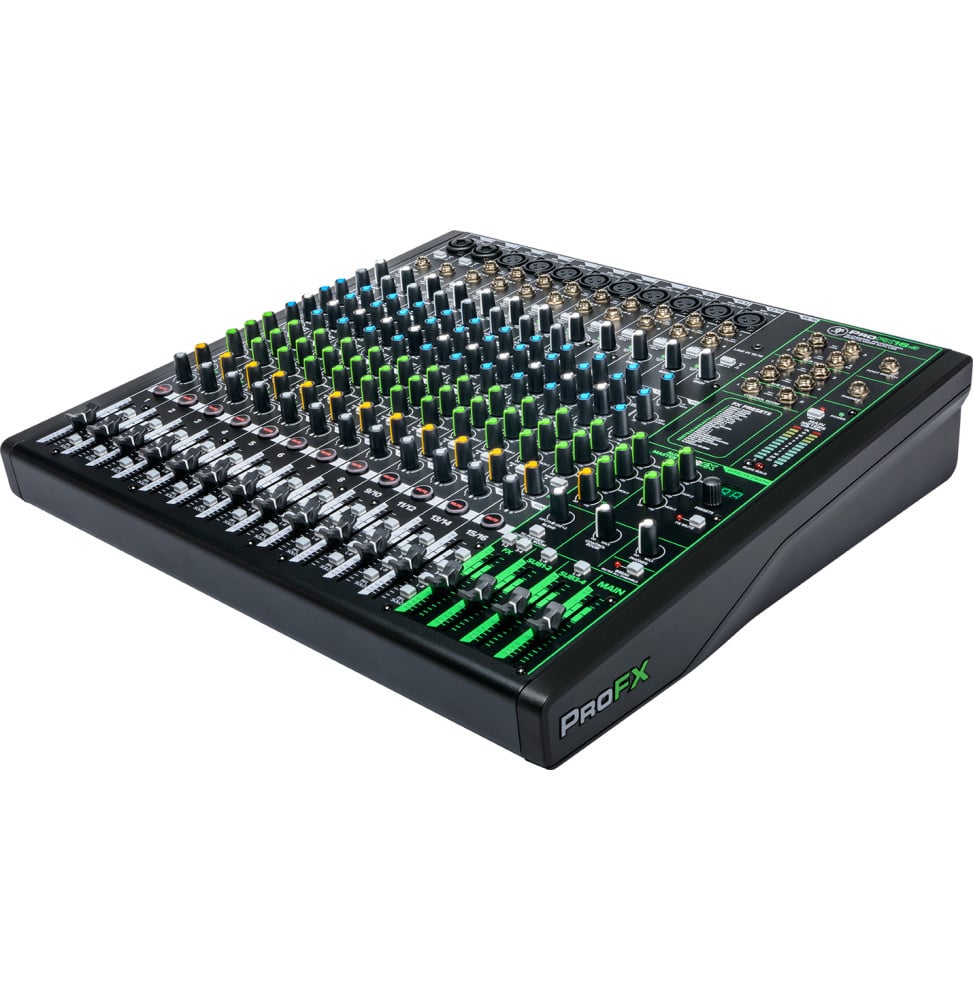
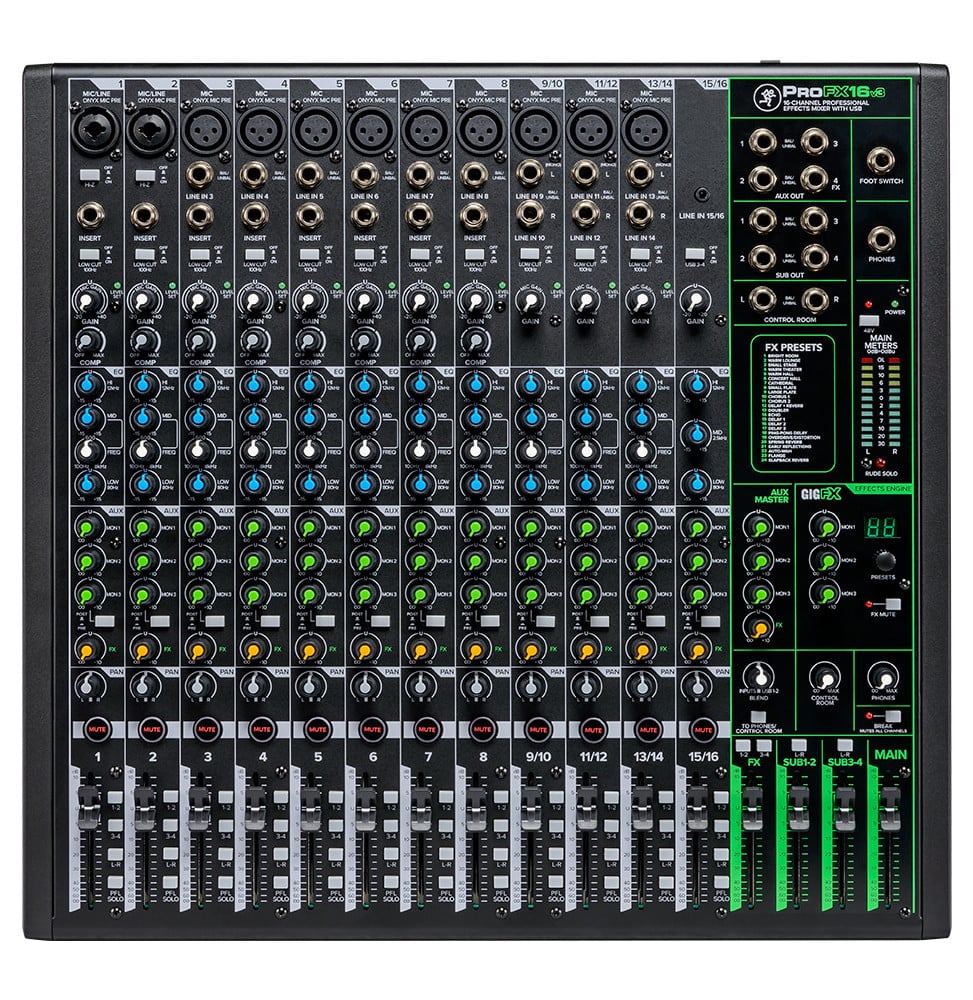
  • 16 channels, 11 Onyx mic preamps
  • Up to 60 dB mic gain, 48 V phantom
  • One-knob compressor, channels 1 to 8
  • 3-band EQ with sweepable mids
  • 24 GigFX effects
  • 3 Aux sends + effects send
  • 4 subgroups
  • USB 2 × 4, 24-bit / 192 kHz
  • Zero-latency monitoring (Blend)
  • 2 Hi-Z inputs for guitar
  • Waveform OEM + 16 plug-ins
Ref.: ProFX16v3
7 860,00 DHincl. VAT

Limited quantity

Earn 79 DH in loyalty credit with this purchaseHow does it work?Loyalty credit capped at 300 DH per order.

3 ways to get it

In-store collection — free

Casablanca store
Available within 24 h
We bring it there and call you when it arrives

Manoir des Roses Residence, Lot 18, El Hachmi El Filali Boulevard, Bachkou Roundabout, Casablanca

Opening hours

  • Mon–Fri: 10am – 7pm
  • Sat: 10am – 2pm
  • Closed on Sundays and public holidays

Payment on site: cash, bank card via terminal, certified cheque.

View the map on Google Maps

Témara pickup point
Available within 48 h
We bring it there and call you when it arrives

Hassan II Boulevard, Les Perles de Témara Residence, Building 5, Apartment 2, Témara

Opening hours

  • Mon–Thu: 8.30am – 6pm
  • Fri: 8.30am – 1.30pm / 2.30pm – 6pm
  • Sat: 8.30am – 12.30pm
  • Closed on Sundays and public holidays

Payment on site: cash, bank card via terminal, certified cheque.

View the map on Google Maps

Delivery anywhere in Morocco

free

In stockReceive it between Thu 1 Oct and Sat 3 Oct ·

Delivery to your address

Receive it between Thu 1 Oct and Sat 3 Oct — free delivery all over Morocco

The estimate is refined using actual delivery rounds to your city.

  • Free delivery from 3 000 DH of purchases, all over Morocco.
  • Below that, the same rate in every city for parcels up to 30 kg (delivery to your home or workplace) — the exact amount is shown above, then in the basket.
  • Above 30 kg, the rate follows the parcel's weight. In Casablanca, the flat rate holds up to 120 kg.
  • You are notified by SMS, then called by the courier before your parcel is handed over (delivered by Sapress).
  • Observed delivery time: 1 to 5 working days depending on the city.

Casablanca store

Free pickup

Available within 24 hWe bring it there and call you when it arrives

Témara pickup point

Free pickup

Available within 48 hWe bring it there and call you when it arrives

1 year warranty — free repair in Morocco if it breaks down during the warranty period

1 year manufacturer's warranty

This product is covered for 1 year by a manufacturer's warranty (the brand's official warranty). Your iris.ma invoice serves as the warranty document: keep it safe.

A problem with your product? Don't worry: contact us by phone, WhatsApp or e-mail. Depending on the brand, we direct you either straight to the repairer appointed by the brand to fix your product, or to us — and we take care of the rest.

  • If a repair is possible, it is carried out free of charge.
  • If the product cannot be repaired, the brand offers an exchange for another product.
  • If no product is available, a refund is issued as soon as the brand confirms it.

Faulty straight out of the box? Some brands offer an immediate exchange, others a repair. Contact us to find out what applies to your product.

The warranty covers breakdowns occurring under normal use, as defined by the brand's terms. Product breakage (drop, impact, liquid…) is not covered, nor are certain consumable parts.

New, never opened — our commitment

All our products are new, delivered in their sealed original packaging.

We commit to never sending you a product that has been opened, unboxed or returned by another customer — even one “just opened for checking”.

Any doubt on delivery (damaged box, seal already opened)? Point it out to the courier or contact us immediately: we take the product back and send you another one.

Sales invoice

Every order comes with its sales invoice, included with the parcel (handed over in person for a store collection).

Ordering for a company? Using the details you give at checkout (company name and ICE), the invoice is issued in your company's name, with its ICE.

Need a quote? Request a free quote — reply within 24 working hours.

100% secure payment: Bank transfer · Bank card · Cash on delivery · Certified cheque

Accepted payment methods

Bank transfer

Simply transfer the amount shown to account 007 826 0002684000000426 89 — SGM2I, Attijariwafa bank. The rest (the reference to quote, sending us the proof, tracking) is explained right after confirmation and by email. An instant transfer is recommended: it saves you 24 hours on the delivery time.

Bank card

Your everyday Moroccan bank card is enough — Visa, Mastercard or CMI, no special card required. Foreign cards are accepted too. Secure payment by Attijari Payment.

Cash on delivery

Pay the courier in cash on delivery — no fee.

Certified cheque

Certified cheque payable to “sgm2i”. Have your bank certify the cheque, then send us a copy on WhatsApp (+212 6 64 10 46 24) or to service.client@iris.ma — we dispatch as soon as we receive it.

Card deposit + balance in cash on delivery

Pay 310 MAD up front by card, then 7 550 MAD in cash on delivery. The deposit is not refunded if you cancel your order.

Bank transfer deposit + balance in cash on delivery

Transfer 310 MAD up front, then pay 7 550 MAD in cash on delivery. Simply transfer the amount shown to account 007 826 0002684000000426 89 — SGM2I, Attijariwafa bank. The rest (the reference to quote, sending us the proof, tracking) is explained right after confirmation and by email. The deposit is not refunded if you cancel your order. An instant transfer is recommended: it saves you 24 hours on the delivery time.

Cash at a bank branch

Pay the cash in at any of the 3,400 Attijariwafa Bank branches in Morocco, to the SGM2I account no. 0268 D 000 000 426. You do not need an account there: your ID and the cash are enough.

The methods offered depend on the order total and the carrier — checkout shows the final list.

Google reviews4.6(558 reviews)
Manufacturer's datasheetView the PDF · 3,9 Mo — downloadable

Product overview

Analog mixer for live sound, houses of worship and recording: 16 channels, 11 Onyx mic preamps and 24 GigFX effects.
Inputs: 11 XLR mic inputs with up to 60 dB of gain and 48 V phantom power, 2 Hi-Z inputs for guitar, stereo mini-jack
Processing: one-knob compressor on channels 1 to 8, 3-band EQ with sweepable mids from 100 Hz to 8 kHz
Monitors: 3 Aux sends and an effects send, 4 subgroups, Control Room output
USB: 2 × 4 interface at 24-bit / 192 kHz, zero-latency monitoring, Waveform OEM software
Build: steel chassis, 450 × 434 × 112 mm, 6.9 kg, built-in mains power supply
A complete stage console that also records the mix, instead of a small mixer without subgroups or effects.

See all the specifications ↓
Request a quote

Be notified of a price drop

Share:

Description

Mackie ProFX16v3 · Reference ProFX16v3

Sixteen channels for the stage,
the stereo mix for the computer.

The ProFX16v3 is the four-subgroup analog mixer of the ProFXv3 series: eleven Onyx mic preamps, a compressor on the first eight channels, 24 GigFX effects and a 24-bit / 192 kHz USB interface, in a 450 × 434 mm steel chassis.
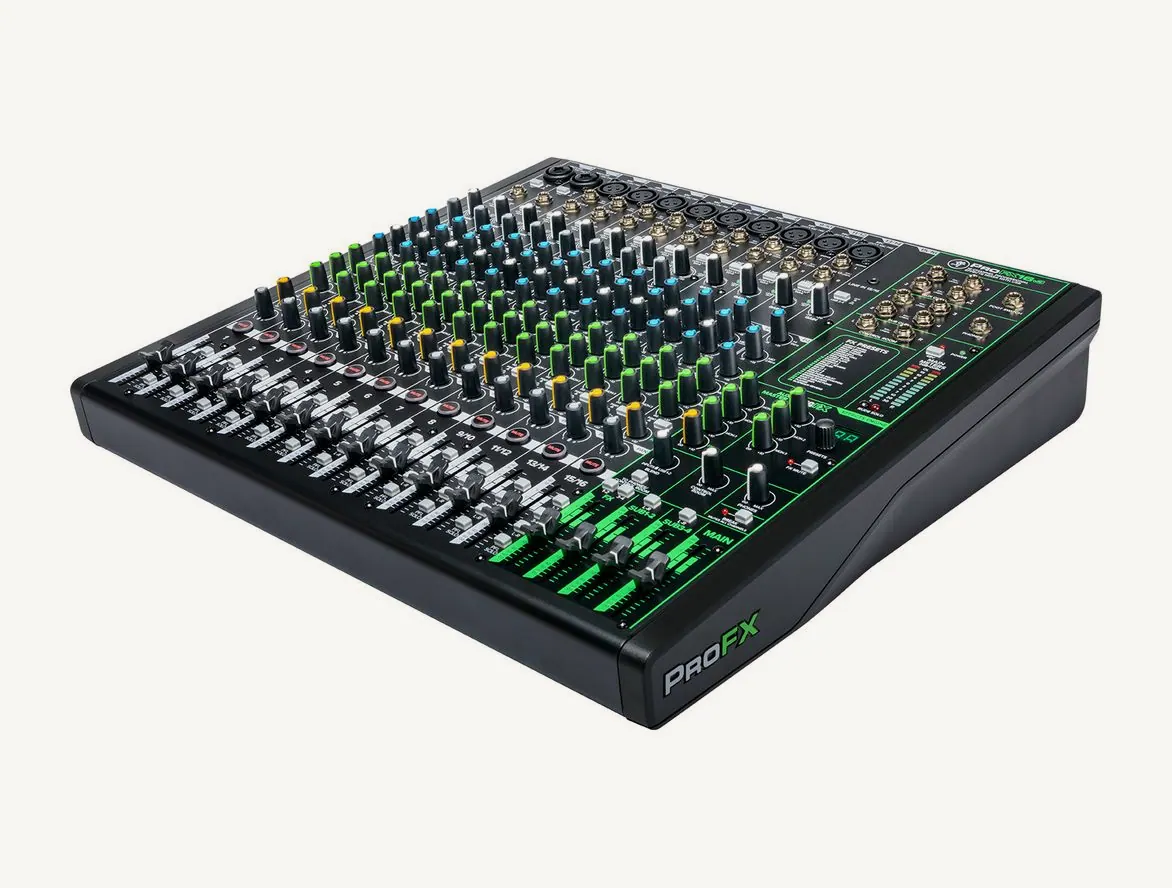
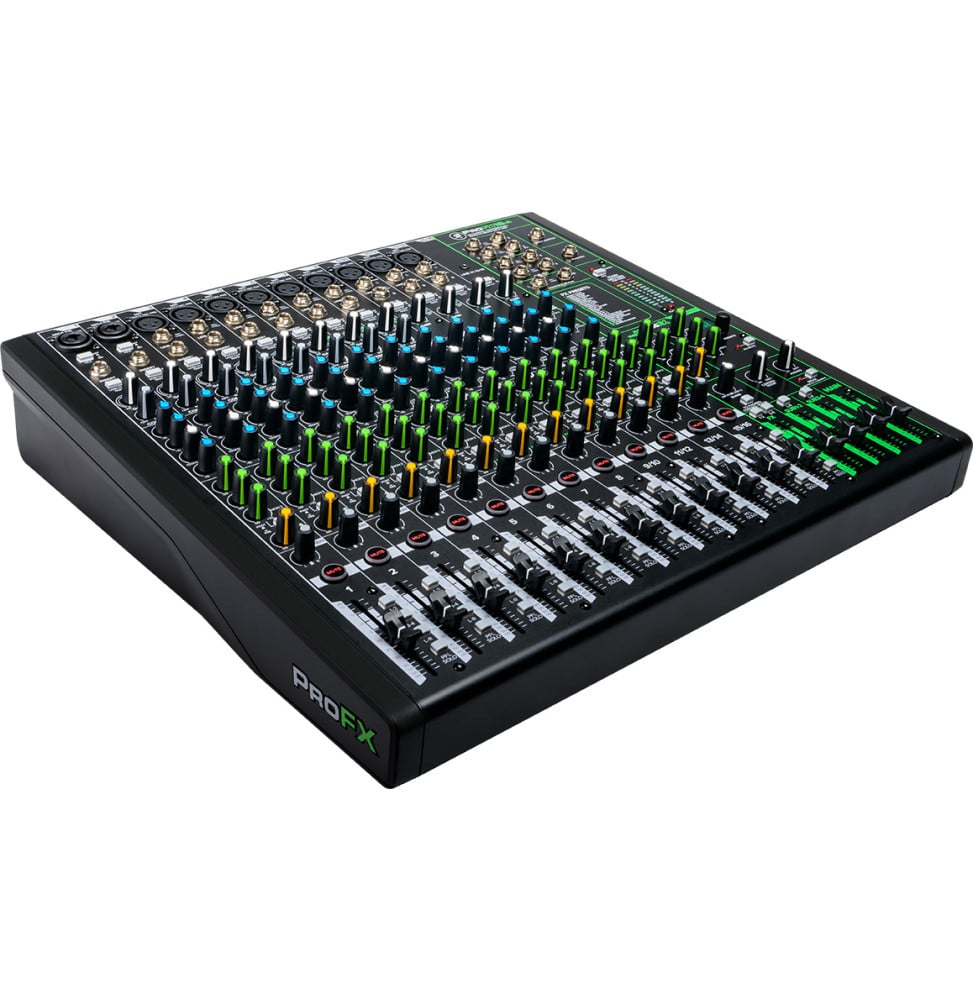
Mackie ProFX16v3 mixer seen in three-quarter view, sixteen channels, faders and master section with green trim
  • 11Onyx mic preamps
  • 60 dBof maximum mic gain
  • 24GigFX effects
  • 192 kHzover USB, 24-bit

Eleven mics, two guitars without a DI box

Channels 1 to 8 each take a microphone on XLR or a line source on a 6.35 mm jack, with an insert for an external processor. Stereo channels 9/10, 11/12 and 13/14 add a mic input to their pair of jacks: eleven Onyx preamps in all, with 0 to 60 dB of gain and shared 48 V phantom power. On channels 1 and 2, the Hi-Z button accepts a guitar or a bass without a DI box. Channel 15/16 takes a phone on mini-jack or the USB 3-4 return.
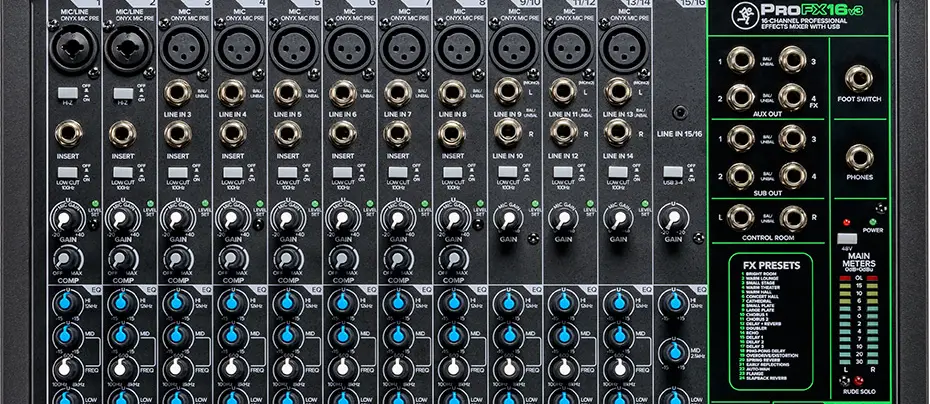
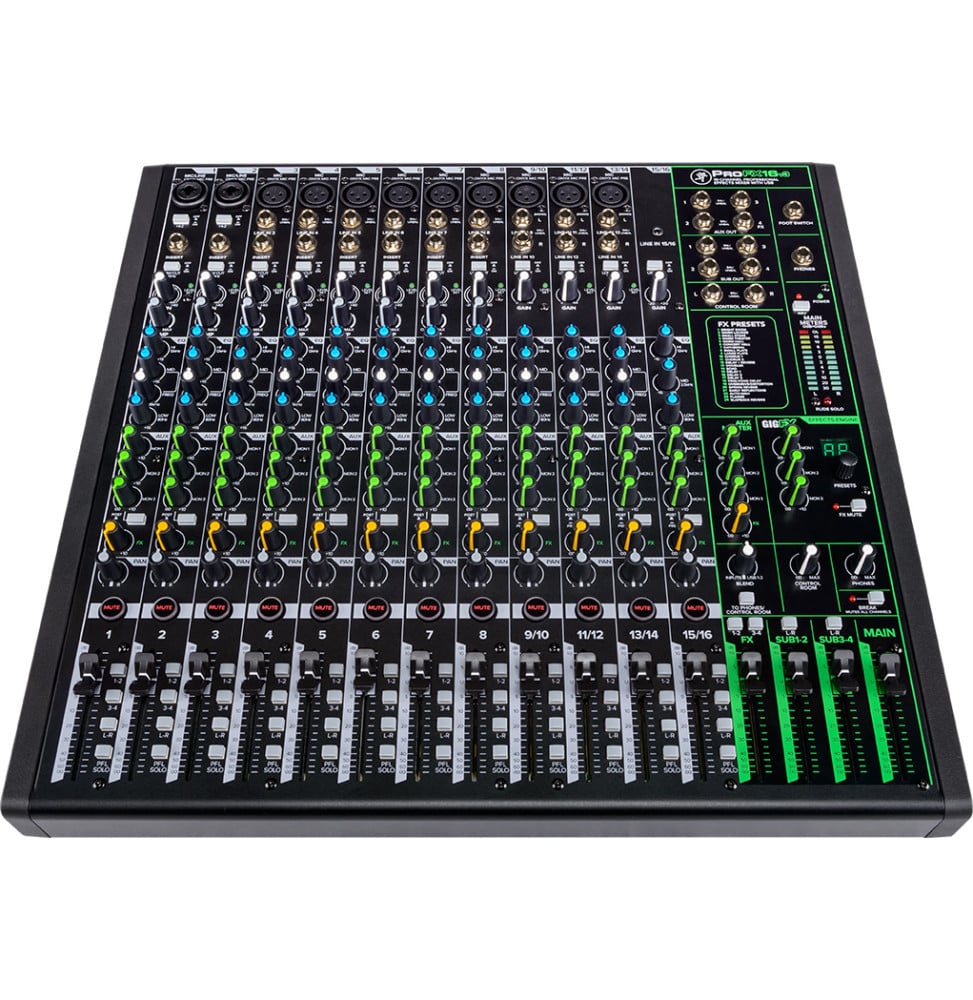
Top of the ProFX16v3 front panel: XLR and jack inputs of channels 1 to 14, inserts, gains, compressors, Aux and subgroup outputsInputs, inserts and compressors on channels 1 to 8, stereo channels with mic input, outputs on the right.

One knob to control a voice

Each of the first eight channels has a single-knob compressor: you set the threshold, while the ratio stays fixed at around 6:1, with a soft-knee curve. Mackie suggests connecting vocals and drum mics to them. Each channel's EQ works on three bands, with mids sweepable from 100 Hz to 8 kHz, and a 100 Hz low cut removes stage rumble.

Three stage monitors, four subgroups

Three Aux sends feed three separate monitor mixes: the first two stay pre-fader, the third can be set pre or post-fader. The internal effects are added to the monitors with their own knobs, and a separate effects send feeds an external processor. The 1-2, 3-4 and L-R buttons route each channel to two pairs of subgroups, each with its stereo fader and two jack outputs.
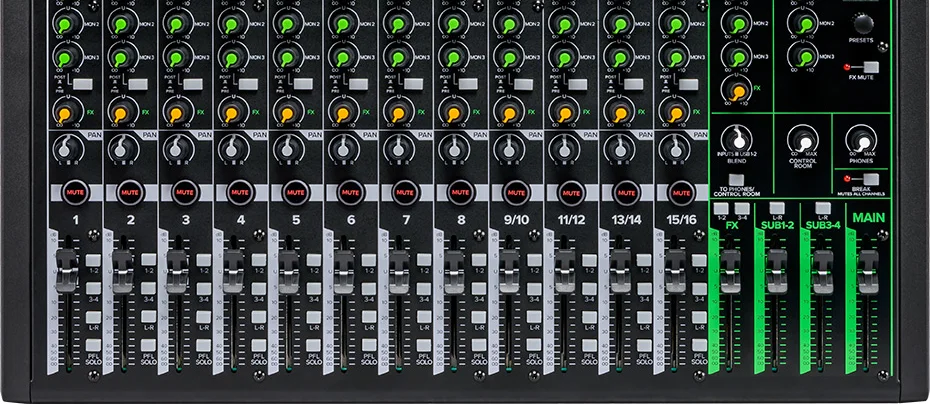
Bottom of the ProFX16v3 front panel: Aux and effects sends, Mute buttons, channel faders, subgroup, effects and main fadersAux and effects sends, channel faders, Sub 1-2 and Sub 3-4 subgroups, main fader.

24 effects, and silence between sets

The GigFX engine offers 24 presets listed on the front panel: room and plate reverbs, cathedral, chorus, delays including a ping-pong, echo, doubler, distortion, auto-wah and flanger. A footswitch plugged into the dedicated jack mutes the effects between songs. The Break button, for its part, mutes every mic and line input to the main outputs, the headphones and the control room during the interval in one move, without touching the monitors.

The mix on the computer, zero-latency monitoring

Through its USB port, the mixer sends one stereo stream to the computer in 24-bit, up to 192 kHz, and receives two. The USB 1-2 return blends with the inputs through the Blend knob, straight into the headphones and the control room output, with no latency: handy for overdubbing. The USB 3-4 return goes through channel 15/16, for interval music or a backing track. Waveform OEM and sixteen DAW Essentials plug-ins are included.

Mackie reference
ProFX16v3
Equivalent input noise
−128 dBu
Distortion
Less than 0.01 %
Maximum XLR output
+28 dBu
Power consumption
40 W, built-in supply
Rack mounting
Optional rack ear kit

The USB interface records the stereo mix, or a submix, and not each microphone on its own track: for channel-by-channel multitrack recording, you need an audio interface with multiple inputs.

For the rest of the chain, see our PA speakers, the studio monitors and all our mixers.

Values taken from Mackie's official ProFX16v3 page, the ProFXv3 series specification sheet and owner's manual, using only the lines specific to the ProFX16v3.

Technical specifications

Technical specifications
Weight (kg)6.9 kg
Dimensions (W x D x H)450 × 434 × 112 mm
Compatible operating systemsmacOS and Windows (Mackie USB driver for Windows)
FeaturesOne-knob compressor on channels 1 to 8 · Mute, PFL Solo and 1-2, 3-4, L-R assign buttons on every channel · Break button that mutes mics and lines between sets
Headphone output6.35 mm stereo jack, separate level, zero-latency direct blend of the inputs and USB 1-2 return (Blend knob)
USB portUSB-B (USB 2.0)
Included softwareWaveform OEM and DAW Essentials Collection: 16 plug-ins (Equaliser, Compressor, Reverber8, Delay Studio, Limiter, Gate / Expander…)
Output harmonic distortionLess than 0.01 % (mic input to main output at +4 dBu)
Output connectionsXLR and 6.35 mm jack main outputs on the rear · 4 subgroups, 3 Aux outputs and effects send on 6.35 mm jacks · Control Room L/R on 6.35 mm jacks · 6.35 mm headphone jack
Input connections11 XLR mic inputs (channels 1 and 2 as XLR/jack combos) · 8 mono line 6.35 mm jacks (channels 1 to 8) · 3 pairs of stereo line 6.35 mm jacks (9/10 to 13/14) · 3.5 mm stereo mini-jack (15/16) · 8 jack inserts 6.35 mm (channels 1 to 8) · footswitch jack
Frequency response20 Hz – 30 kHz (+0 / −1 dB, mic input to any output)
Number of channels16: 8 mono mic/line channels (1 to 8), 3 stereo channels with mic input (9/10, 11/12, 13/14) and 1 stereo mini-jack or USB return channel (15/16)
Mic preamps11 Onyx preamps on XLR inputs, 0 to 60 dB of gain
Instrument inputs2 Hi-Z inputs on 6.35 mm jack (channels 1 and 2, XLR/jack combos), switchable line/instrument
Channel EQ3 bands: low ±15 dB at 80 Hz, mid ±15 dB sweepable from 100 Hz to 8 kHz, high ±15 dB at 12 kHz (mid fixed at 2.5 kHz on channel 15/16)
Auxiliary buses3 Aux sends with outputs (Aux 1 and 2 pre-fader, Aux 3 pre or post-fader) and 1 effects send
Technical specifications (continued)
Simultaneous inputs/outputs2 × 4 over USB: 1 stereo stream to the computer, 2 stereo returns (USB 1-2 and 3-4)
Built-in effectsGigFX engine: 24 presets (reverbs, delays, chorus, flanger, distortion…), send to monitors, mute by button or footswitch
Material(s)Steel chassis, ABS side protection
Power supplyMains 100 to 240 V AC, 50/60 Hz, built-in power supply, 3-pin IEC cord · 40 W power consumption
Phantom power+48 V, global switch for all mic channels
MountingTabletop, or rack-mounted with the ProFX16v3 rack ear kit sold separately
Product type16-channel analog mixer with digital effects and USB audio interface
Level controls12 channel faders, 2 stereo subgroup faders (Sub 1-2 and Sub 3-4), effects fader and main fader
Lighting and indicators2 × 12-segment main meters, level LED on each channel, 48 V, power, solo, effects mute and Break indicators, effect preset display
Low-cut filter and attenuator100 Hz low cut, 18 dB/octave, on channels 1 to 14
Conversion resolution24-bit, 44.1 / 48 / 96 / 192 kHz
Gain rangeMic 0 to +60 dB · mono line −20 to +40 dB · mini-jack channel ±20 dB
Equivalent input noise (EIN)−128 dBu (150 ohm source, 20 Hz – 20 kHz, maximum gain)
Maximum input level+22 dBu on all inputs
Maximum output levelXLR main output +28 dBu · other outputs +22 dBu
Warranty1 year

Specific references

MPNProFX16v3

Customer reviews

No reviews yet

Be the first to review this product and help other customers.

Write a review
Your rating
5/5

Shown publicly with your review.

Never published — a confirmation email will be sent to you.

Tell us about the product — in a few lines:

  • what you liked in everyday use;
  • the quality and performance you found;
  • who you would recommend it to, and why.

A question about an order, a delivery or a payment? Write to us and we will reply to you directly.

Under Law 09-08, you have the right to access, rectify and object to the processing of your personal data. This processing has been authorised by the CNDP under no. D-CE-389/2015. Learn more

Frequently asked questions about this product

How many microphones can be connected to the ProFX16v3?
Eleven. Mono channels 1 to 8 each have an Onyx preamp on XLR, channels 1 and 2 as XLR/jack combos, and the three stereo channels 9/10, 11/12 and 13/14 each add an XLR mic input. Gain goes up to 60 dB and 48 V phantom power is switched on for all mic inputs at once.
Can each microphone be recorded on a separate track?
No. The 2 × 4 USB interface sends a single stereo stream to the computer, in 24-bit up to 192 kHz: you record the mix, or a submix, not the channels one by one. In return, the computer sends back two stereo streams, one for monitoring (USB 1-2), the other to channel 15/16 for background music or a backing track (USB 3-4).
Can a guitar be plugged in directly?
Yes, on channels 1 and 2. Their 6.35 mm jack input switches to high impedance with the Hi-Z button, so a guitar or a bass can be connected without a DI box. On the other channels, a guitar plugged in without a DI box will sound dull: insert one, or use channels 1 and 2.
How many stage monitors can be fed?
Three separate monitor mixes, through Aux sends 1, 2 and 3, each with its own jack output. Aux 1 and 2 are pre-fader, so independent of the front-of-house mix; Aux 3 can be set pre or post-fader. The internal effects can be added to each monitor with their own knobs, and a separate effects send feeds an external processor.
Which effects does the mixer offer?
The GigFX engine offers 24 presets: room and plate reverbs, cathedral, chorus, delays including a ping-pong, echo, doubler, distortion, auto-wah and flanger. You pick the effect with the selector and its display, set the send on each channel, and a button or a footswitch on the dedicated jack mutes the effects between songs.
How do you monitor yourself without latency while recording?
With the Blend knob. With the To Phones / Control Room button pressed, it blends the mixer inputs and the computer's USB 1-2 return straight into the headphones and the Control Room output, without going through the computer, so with no latency. Turned left you only hear the inputs, right only the computer, centre both equally.
Can the ProFX16v3 be installed in a rack?
Yes, with the rack ear kit made for the ProFX16v3, sold separately. Without it, it sits on a table: it measures 450 × 434 × 112 mm and weighs 6.9 kg, with a steel chassis and ABS side protection. A dust cover and a carry bag sized for it are also available as accessories.
Which software comes with the mixer?
The Waveform OEM recording software and the DAW Essentials collection, i.e. 16 plug-ins including Equaliser, Compressor, Reverber8, Delay Studio, Limiter and Gate / Expander. On Windows, Mackie provides a USB driver to download from its website; the mixer records in 24-bit at 44.1, 48, 96 or 192 kHz.
How is the mixer powered?
From the mains, through a built-in universal power supply for 100 to 240 V, 50 or 60 Hz, and a 3-pin IEC cord: no external power block to find room for under the table. Its power consumption is 40 W. The on/off switch and the power socket are on the rear, next to the USB port and the main outputs.

Chat on WhatsApp

Scan with my phone

The simplest way: open your phone camera and point it at this code. The chat opens with your message ready.

Open WhatsApp Web

Works if your phone is already linked to this computer.

Prefer to call? (+212) 05 30 31 64 21