Welcome to the new iris.ma

We rebuilt everything for you

Same team, same standards

Pay nowView my order

Which toner fits the HP LaserJet Pro 3303sdw?

Colour laser · machine reference 499M6A

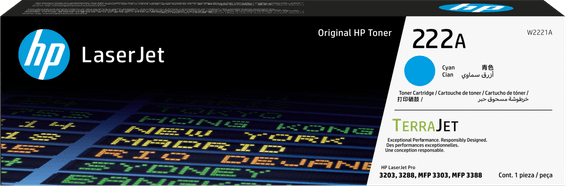
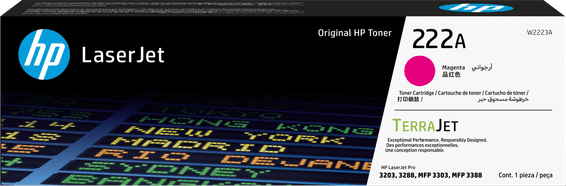
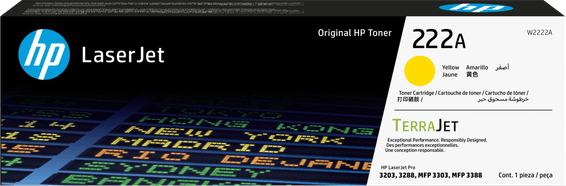
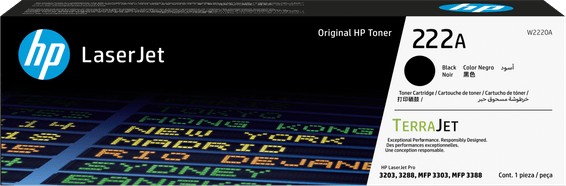
Four HP 222A toners: W2220A black (1,300 pages), W2221A cyan, W2223A magenta and W2222A yellow (1,200 pages each). The 222X version rises to 3,200 pages in black and 2,500 per colour. This machine has one useful feature: a priority single-sheet feed slot, which suits it to envelopes and thick papers.

Compatible toners

See all
  • NoirToner
    HP 222A Noir (W2220A) - Toner HP LaserJet d'origine
    Best seller

    HP

    HP 222A Noir (W2220A) - Toner HP LaserJet d'origine

    Compatible avec les imprimantes HP LaserJet Pro 3201 à 3204, 3288 et 3303, pour environ 1 300 pages.

    In stock

    1 339 DHincl. VAT

    Delivery everywhereDelivered all over Morocco

  • CyanToner
    HP 222A Cyan (W2221A) - Toner HP LaserJet d'origine
    Best seller

    HP

    HP 222A Cyan (W2221A) - Toner HP LaserJet d'origine

    Compatible avec les imprimantes HP LaserJet Pro 3201 à 3204, 3288 et 3303, pour environ 1 200 pages.

    In stock

    1 479 DHincl. VAT

    Delivery everywhereDelivered all over Morocco

  • MagentaToner
    HP 222A Magenta (W2223A) - Toner HP LaserJet d'origine
    Best seller-100 DH

    HP

    HP 222A Magenta (W2223A) - Toner HP LaserJet d'origine

    Compatible avec les imprimantes HP LaserJet Pro 3201 à 3204, 3288 et 3303, pour environ 1 200 pages.

    In stock

    1 479 DHincl. VAT1 579 DH

    Delivery everywhereDelivered all over Morocco

  • JauneToner
    HP 222A Jaune (W2222A) - Toner HP LaserJet d'origine
    Best seller

    HP

    HP 222A Jaune (W2222A) - Toner HP LaserJet d'origine

    Compatible avec les imprimantes HP LaserJet Pro 3201 à 3204, 3288 et 3303, pour environ 1 200 pages.

    In stock

    1 479 DHincl. VAT

    Delivery everywhereDelivered all over Morocco

4 references available · we confirm availability before dispatch and tell you straight away if we cannot fulfil it.

Thick paper: the toner is not lacking, it sticks badly

On a laser, the image is not soaked into the fibre the way ink is: the powder is laid down and then fused onto the sheet by a fuser running above 150 °C. A thick or rough medium goes through that fuser faster than it heats through, and the toner sticks less well — hence prints that flake at the fold of an envelope or when a card is scratched.

This is not a cartridge problem, and changing toner will not help. What works: declaring the right media type in the driver ("heavy", "envelope", "card"). The machine then deliberately slows down to give the fuser time to do its work.

What the priority slot makes possible

The main tray holds 250 sheets for everyday use; the priority feed takes sheets one at a time, without emptying or reloading the tray. That is what makes it practical to print an envelope between two documents, or a cover on heavy paper in the middle of an ordinary run.

The weight accepted goes up to 200 gsm on suitable media. Beyond that, or on a strongly textured paper, fusing becomes unreliable whatever the setting.

222A or 222X on a 25-page-per-minute machine

With a duty cycle of 40,000 pages a month, the 3303sdw is an office colour machine, not a standby one. The 222X multiplies each cartridge's yield by 2.5 and divides the number of times you take four toners out by as much.

The MFP 3303fdw takes exactly the same part numbers and adds fax; its page sets out the confusion between the 222A and earlier families — a trap that costs dearly at the moment of ordering.

Frequently asked questions

Why does the print flake on envelopes?
Because the toner has not fused completely: a thick medium does not heat through at normal speed. Select the "envelope" or "heavy paper" type in the driver — the machine slows down and fusing becomes correct. The toner is not at fault.
Can the 222X and 222A be mixed in the same machine?
Yes, with no setting: you can fit the black in 222X and leave the colours in 222A. That is in fact often the best compromise, black running out three to four times faster than each colour on an office machine.
Does colour need to be printed regularly?
It is not necessary on a laser: the powder is dry and does not dry out, unlike liquid ink. A machine left for months without printing in colour finds its colours exactly as they were — one of the real advantages of laser over inkjet.

Other HP LaserJet Pro

A fleet of printers to keep supplied?

We draw up the list of consumables for your whole fleet and a single grouped quote. Invoice in your company's name with its ICE number, delivery anywhere in Morocco.

Looking for another machine? Search by model or by cartridge reference. To understand page yields and cost per page, read our toner and cartridge guide.

Chat on WhatsApp

Scan with my phone

The simplest way: open your phone camera and point it at this code. The chat opens with your message ready.

Open WhatsApp Web

Works if your phone is already linked to this computer.

Prefer to call? (+212) 05 30 31 64 21