Welcome to the new iris.ma

We rebuilt everything for you

Same team, same standards

Pay nowView my order

Which toner fits the HP Color LaserJet Pro M255dw?

Colour laser · machine reference 7KW64A

The M255dw takes four HP 207A toners: the black (W2210A) for about 1,350 pages, and cyan, magenta and yellow for about 1,250 pages each. The black also comes as a 207X, about 3,150 pages. The same series serves the M282 and M283 multifunction models.

Compatible toners

See all
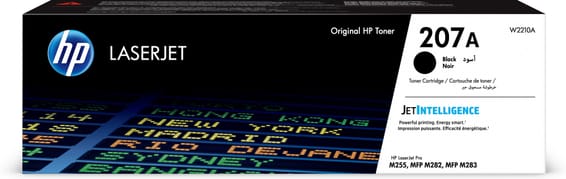
  • NoirToner
    HP 207A Noir (W2210A) - Toner HP LaserJet d'origine
    Best seller-5%

    HP

    HP 207A Noir (W2210A) - Toner HP LaserJet d'origine

    Compatible avec les imprimantes HP Color LaserJet Pro M255 et les multifonctions M282, pour environ 1 350 pages.

    In stock

    1 219 DHincl. VAT1 279 DH

    Delivery everywhereDelivered all over Morocco

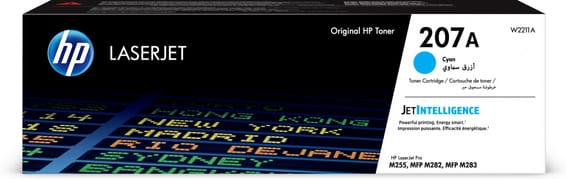
  • CyanToner
    HP 207A Cyan (W2211A) - Toner HP LaserJet d'origine
    Best seller-5%

    HP

    HP 207A Cyan (W2211A) - Toner HP LaserJet d'origine

    Compatible avec les imprimantes HP Color LaserJet Pro M255 et les multifonctions M282, pour environ 1 250 pages.

    In stock

    1 429 DHincl. VAT1 499 DH

    Delivery everywhereDelivered all over Morocco

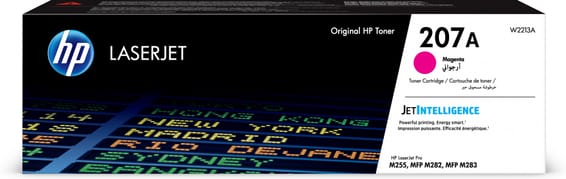
  • MagentaToner
    HP 207A Magenta (W2213A) - Toner HP LaserJet d'origine
    Best seller

    HP

    HP 207A Magenta (W2213A) - Toner HP LaserJet d'origine

    Compatible avec les imprimantes HP Color LaserJet Pro M255 et les multifonctions M282, pour environ 1 250 pages.

    In stock

    1 490 DHincl. VAT

    Delivery everywhereDelivered all over Morocco

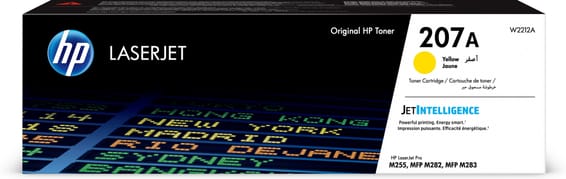
  • JauneToner
    HP 207A Jaune (W2212A) - Toner HP LaserJet d'origine
    Best seller

    HP

    HP 207A Jaune (W2212A) - Toner HP LaserJet d'origine

    Compatible avec les imprimantes HP Color LaserJet Pro M255 et les multifonctions M282, pour environ 1 250 pages.

    In stock

    1 490 DHincl. VAT

    Delivery everywhereDelivered all over Morocco

Also compatible, currently unavailable

This reference fits this machine. Ask to be told when they are back, or ask us for a lead time.

4 references available · 1 awaiting restocking · we confirm availability before dispatch and tell you straight away if we cannot fulfil it.

With no scanner, consumption can be calculated

The M255dw prints, and nothing else: no copying, no scanning, no fax. That is a limitation when buying, but an advantage when the time comes to estimate cartridges.

On a multifunction, three uses consume toner without leaving any usable trace: copying, which goes through no workstation, faxing, which prints on its own on reception, and printing from a USB stick. Many offices discover this way that they use twice what they thought they printed.

Here, none of that. Everything that comes out was asked for by somebody, from a workstation, through a driver that keeps a record. The recommended monthly volume — 150 to 2,500 pages — therefore compares directly with what your users actually print, and the replacement-pace calculation comes out right: at the ceiling, a 207A black lasts sixteen days, a 207X a little over a month.

Black goes faster, and by a long way

The yields are almost identical — 1,350 against 1,250 — but they do not describe use. Black works alone on every ordinary document; the three colours are used only together, and only on colour output. Count on two to three blacks per set of colours.

That is why HP offers the 207X on the black: the typical order pairs a high-capacity black with standard-capacity colours. Taking the same format throughout brings nothing.

Compact, but well connected

A 6.8 cm colour touchscreen, automatic duplex, a 250-sheet tray, Wi-Fi and Ethernet, plus a USB host port at the front. It prints 21 pages per minute and its maximum cycle reaches 40,000 pages — a mechanical limit, never a basis for calculation. The consumable is strictly the same as on the M283fdw, its multifunction big sister.

Frequently asked questions

Is the M255dw's 207A compatible with an M282?
Yes, the Color LaserJet Pro M255 and the M282 and M283 multifunction models share the 207A series. Do not confuse it with the 203A of the M254, M280 and M281: one digit apart, two generations, no compatibility.
How do I find out how many pages I have printed?
The configuration page, printed from the panel, gives the machine's total counter and each toner's level. On a printer with no scanner, that counter matches exactly the jobs sent from workstations — the best starting point for sizing your orders.

Other HP LaserJet Pro

A fleet of printers to keep supplied?

We draw up the list of consumables for your whole fleet and a single grouped quote. Invoice in your company's name with its ICE number, delivery anywhere in Morocco.

Looking for another machine? Search by model or by cartridge reference. To understand page yields and cost per page, read our toner and cartridge guide.

Chat on WhatsApp

Scan with my phone

The simplest way: open your phone camera and point it at this code. The chat opens with your message ready.

Open WhatsApp Web

Works if your phone is already linked to this computer.

Prefer to call? (+212) 05 30 31 64 21