
Welcome to the new iris.ma

We rebuilt everything for you

Same team, same standards

Pay nowView my order

Which toner fits the HP LaserJet Pro M130fn?

Monochrome laser · machine reference G3Q59A

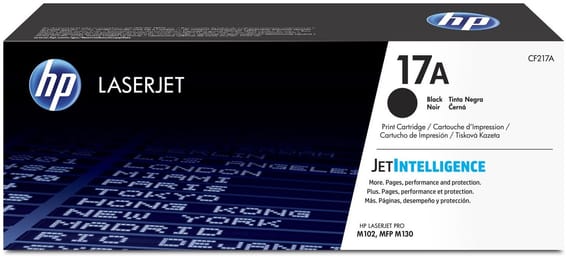
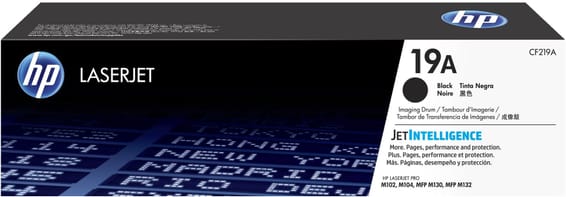
The HP 17A toner (CF217A, about 1,600 pages), together with a 19A drum (CF219A) that is changed far less often. Two letters in this machine's name explain why it goes through toner faster than its sisters: the f of fax and the n of network.

Compatible toners

See all
  • NoirToner
    HP 17A Noir (CF217A) - Toner HP LaserJet d'origine
    Best seller-4%

    HP

    HP 17A Noir (CF217A) - Toner HP LaserJet d'origine

    Compatible avec les imprimantes HP LaserJet Pro M102 et les multifonctions M130, pour environ 1 600 pages.

    In stock

    1 339 DHincl. VAT1 399 DH

    Delivery everywhereDelivered all over Morocco
  • NoirTambour ou kit de maintenance
    HP 19A Noir (CF219A) - Tambour d'imagerie HP LaserJet d'origine

    HP

    HP 19A Noir (CF219A) - Tambour d'imagerie HP LaserJet d'origine

    Compatible avec les imprimantes HP LaserJet Pro M102/M104 et multifonction Pro M130/M132, pour environ 12 000 pages.

    In stock

    1 109 DHincl. VAT

    Delivery everywhereDelivered all over Morocco

2 references available · we confirm availability before dispatch and tell you straight away if we cannot fulfil it.

Learning to read your machine's name

HP codes the functions into the model suffix, and it holds across almost the whole LaserJet range:

  • n — Ethernet networking, so a shared machine;
  • w — Wi-Fi (the M130fn has none, it connects by cable);
  • d — automatic duplex;
  • f — fax;
  • s — automatic document feeder.

This is not trivia: those letters decide the consumable across several series, and here they explain the gap in consumption between two machines that take the same toner.

Two functions that print without you

On a USB machine sitting next to its user, every printed page has been decided on. On the M130fn, two sources escape that control:

  • an incoming fax comes out on its own, advertising included, at night and at weekends too. Receiving to memory, which can be set in the fax menu, removes that consumption;
  • network sharing puts the machine at the disposal of the whole office, including people with no idea of the toner's state.

On a recommended cycle of 10,000 pages a month and a 1,600-page toner, the margin for error is thin: this is a machine where someone has to be put in charge of watching the stock.

The drum, not to be confused with the toner

The 19A is a separate part, rated for 12,000 pages — about seven and a half toners. A fault that always comes back at the same place on the page comes from it, not from the powder. The M130a page sets out that ratio and the right reordering pace; the two machines share exactly the same consumables.

Frequently asked questions

How do I stop junk faxes eating the toner?
Turn on reception to memory in the fax menu: incoming documents are stored and print only on request. In an office that receives few useful faxes, that is several hundred pages saved a year.
What does the "fn" in M130fn mean?
f for fax, n for network (Ethernet). The M130a has neither and connects over USB. Both take the 17A toner: the suffix changes the functions, not the consumable.
Can the toner level be seen from a computer on the network?
Yes. A networked machine exposes an embedded web server: type its IP address into a browser and the state of the consumables appears. The address is on the configuration report, printable from the control panel.

Other HP LaserJet Pro

A fleet of printers to keep supplied?

We draw up the list of consumables for your whole fleet and a single grouped quote. Invoice in your company's name with its ICE number, delivery anywhere in Morocco.

Looking for another machine? Search by model or by cartridge reference. To understand page yields and cost per page, read our toner and cartridge guide.

Chat on WhatsApp

Scan with my phone

The simplest way: open your phone camera and point it at this code. The chat opens with your message ready.

Open WhatsApp Web

Works if your phone is already linked to this computer.

Prefer to call? (+212) 05 30 31 64 21