
Welcome to the new iris.ma

We rebuilt everything for you

Same team, same standards

Pay nowView my order

Which toner fits the HP LaserJet Pro 4003dw?

Monochrome laser · machine reference 2Z610A

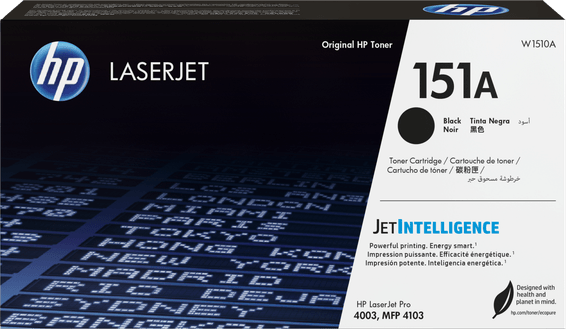
The LaserJet Pro 4003dw takes only one consumable: the HP 151A black toner (W1510A), rated for about 3,050 pages, or its high-capacity 151X version (W1510X), about 9,700 pages. There is no drum to change separately: the imaging cylinder is built into the cartridge, and goes with it.

Compatible toners

See all
  • NoirToner
    HP 151A Noir - Toner HP LaserJet d'origine (W1510A)
    -4%

    HP

    HP 151A Noir - Toner HP LaserJet d'origine (W1510A)

    Compatible avec l'imprimante HP LaserJet Pro 4003 et le MFP 4103, pour environ 3 050 pages.

    In stock

    2 195 DHincl. VAT2 289 DH

    Delivery everywhereDelivered all over Morocco

Also compatible, currently unavailable

This reference fits this machine. Ask to be told when they are back, or ask us for a lead time.

1 reference available · 1 awaiting restocking · we confirm availability before dispatch and tell you straight away if we cannot fulfil it.

One toner, how many reams of paper?

A yield in pages means nothing to anyone until it is converted. An ordinary ream holds 500 sheets: the 151A therefore empties a little over six reams, the 151X a little under twenty. Related to this machine's capacity — 350 sheets split between a 250-sheet main tray and a 100-sheet secondary tray — you will reload paper about nine times before touching the toner with a 151A, and twenty-eight times with a 151X.

That is the real criterion for choosing between the two part numbers, far more than the shelf price: if you reload paper several times a week, the 151A will have you ordering a toner every six weeks.

What volume can this machine take?

HP quotes a maximum cycle of 80,000 pages, but recommends a monthly volume of 750 to 4,000 pages. Those two figures do not serve the same purpose: the first says what the mechanism can take before wearing out, the second what it can sustain month after month without overheating. At the 4,000-page ceiling, a 151A lasts three weeks, a 151X a little over two months.

It prints up to 40 pages per minute, with automatic duplex, on weights from 60 to 120 gsm. Beyond 120 gsm, feeding is not guaranteed — that is the limit to know before ordering heavy paper for covers.

Is the 4003dw the same machine as the 4103?

No, and it is the most common confusion when ordering. The 4003 prints, and that is all. The 4103 is a multifunction: it scans and copies as well. Both take exactly the same toner, however, which is why both names appear on the same 151A box.

Frequently asked questions

Does the 151X go into a 4003dw with no adjustment?
Yes. The 151X has the same format and the same slot as the 151A; it simply holds more toner. The machine recognises the cartridge and adjusts its level counter on its own, with no handling at all. The same 151X also serves the 4003dn and the 4103 multifunction models.
Does the 4003dw's drum have to be changed?
No, there is nothing to change separately. The imaging drum is built into the cartridge: every new toner brings a new cylinder. That is what sets this range apart from enterprise lasers, where the drum is a separate part with its own life span and its own price.
What should I do when the printer reports a low level?
Nothing urgent: the warning comes well before the real end, and several hundred pages are usually left. It is the right moment to order, not to replace. Taking the cartridge out and rocking it gently from side to side redistributes the remaining powder and often gains another hundred pages.

Other HP LaserJet Pro

A fleet of printers to keep supplied?

We draw up the list of consumables for your whole fleet and a single grouped quote. Invoice in your company's name with its ICE number, delivery anywhere in Morocco.

Looking for another machine? Search by model or by cartridge reference. To understand page yields and cost per page, read our toner and cartridge guide.

Chat on WhatsApp

Scan with my phone

The simplest way: open your phone camera and point it at this code. The chat opens with your message ready.

Open WhatsApp Web

Works if your phone is already linked to this computer.

Prefer to call? (+212) 05 30 31 64 21