Pay nowView my order
Visit the Cisco Systems store

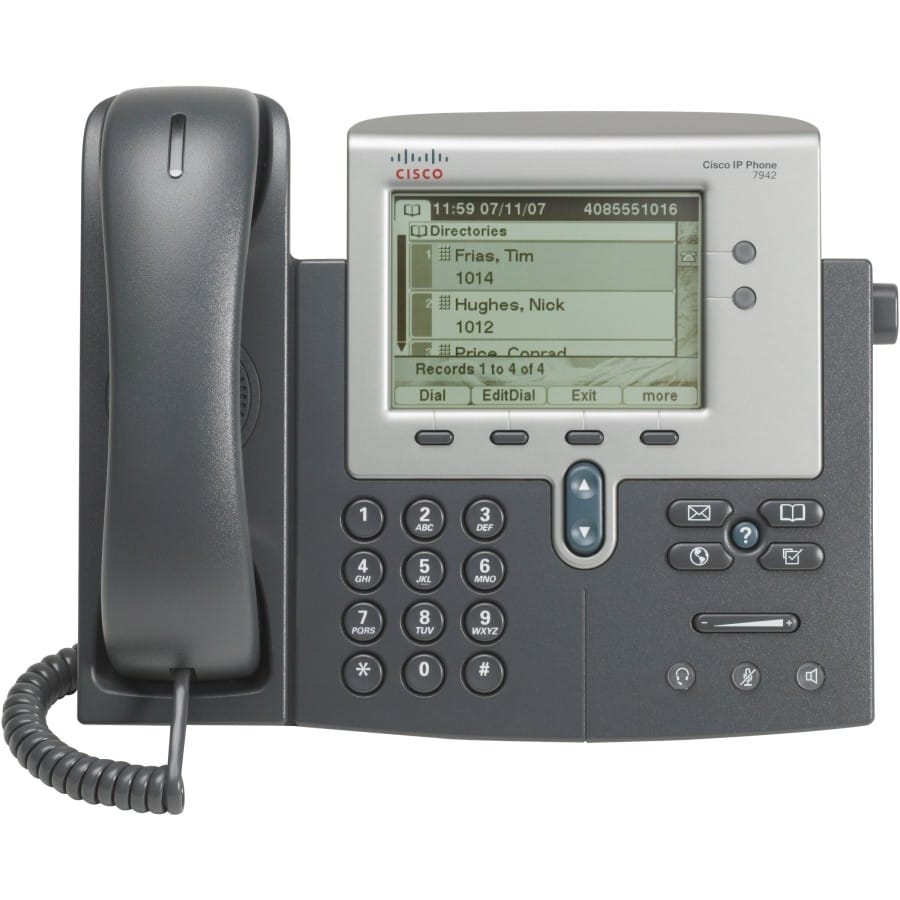
Cisco Unified 7942G VoIP Phone with 5" Monochrome Display - PoE

SCCP- and SIP-compatible, it fits a proprietary phone system as readily as a SIP IP PBX. Hands-free speaker, dedicated headset socket and 128-bit AES encryption of calls.

  • SCCP and SIP VoIP protocols
  • 2 RJ-45 Ethernet ports
  • Dedicated headset socket
  • Built-in hands-free speaker
  • G.711a, G.722, G.729a and iLBC voice codecs
  • 128-bit AES encryption
  • Transfer, forwarding and conference calling
  • Caller ID and call waiting
  • Weight 1.6 kg
  • Dimensions 267 x 152 x 203 mm
Ref.: CP-7942G
304,00 DHincl. VAT

Out of stock

Under Law 09-08, you have the right to access, rectify and object to the processing of your personal data. This processing has been authorised by the CNDP under no. D-CE-389/2015. Learn more

Can’t wait?

Ask for an alternative on WhatsApp

Quick reply

Product overview

Cisco Unified 7942G VoIP phone with 5" HD screen (320 x 222), 4-bit greyscale monochrome graphical display - Speakerphone - 2 x Ethernet LAN ports (RJ-45), 1 x headset port - Voice codecs: G.711a, G.722, G.729a, iLBC - VoIP protocols: SCCP, SIP - DHCP client - Supported network protocols: TFTP, DHCP - Security: 128-bit AES - 1.6 kg

See all the specifications ↓
Request a quoteShare:

Technical specifications

Technical specifications
Display5 inches, 320 x 222, 4-bit greyscale monochrome graphic
Dimensions (W x D x H)267 x 152 x 203 mm
SpeakerYes
Voice codecsG.711a, G.722, G.729a, iLBC
VoIP protocolsSCCP, SIP
Call managementCaller identification (Caller ID), Conference calling capability, Call forwarding, Call waiting, Call transfer
Supported network protocolsTFTP, DHCP
Network interfaces2 Ethernet LAN ports (RJ-45)
Weight1.6 kg
Technical specifications (continued)
Security128-bit AES
Power supplyPower over Ethernet (PoE)
PoE powerYes
Device typeDesk phone
Display typeMonochrome display
Supported handsetsNone (standalone device)
Connectivity1 headset port
Warranty1 year

Customer reviews

No reviews yet

Be the first to review this product and help other customers.

Write a review
Your rating
5/5

Shown publicly with your review.

Never published — a confirmation email will be sent to you.

Tell us about the product — in a few lines:

  • what you liked in everyday use;
  • the quality and performance you found;
  • who you would recommend it to, and why.

A question about an order, a delivery or a payment? Write to us and we will reply to you directly.

Under Law 09-08, you have the right to access, rectify and object to the processing of your personal data. This processing has been authorised by the CNDP under no. D-CE-389/2015. Learn more

Frequently asked questions

What are the delivery times and fees?
Delivery all over Morocco within 1 to 5 working days, at the same rate in every city for parcels up to 30 kg — and free delivery from 3 000 dh of purchases. Above 30 kg, the rate follows the weight and is shown on the product page and in the basket. You are notified by SMS, then called by the courier.
Is the product new and under warranty?
Yes: a new, genuine product, delivered in its original packaging with an invoice. The invoice serves as the warranty document (1 year) with the manufacturer's after-sales service in Morocco.
Can I collect my order in store?
Yes, at the Casablanca store (Mon–Fri 10am–7pm · Sat 10am–2pm) or the Témara collection point (Mon–Thu 8.30am–6pm · Fri 8.30am–1.30pm / 2.30–6pm · Sat 8.30am–12.30pm). Payment on site: cash, bank card via terminal, certified cheque.
Which payment methods do you accept?
Bank card online (secure Payzone), cash on delivery, bank transfer and certified cheque. All our prices are in dirhams, VAT included.
Can I get an invoice in my company's name (with its ICE)?
Yes. Provide your company's legal name and ICE when ordering: the invoice is issued in its name and enclosed with the parcel (handed over with the order for in-store collection). Companies and public bodies can also request a quote — reply within 24 working hours.

Trending

View the Cisco Systems archive

Chat on WhatsApp

Scan with my phone

The simplest way: open your phone camera and point it at this code. The chat opens with your message ready.

Open WhatsApp Web

Works if your phone is already linked to this computer.