

Pay nowView my order
Visit the Dell store

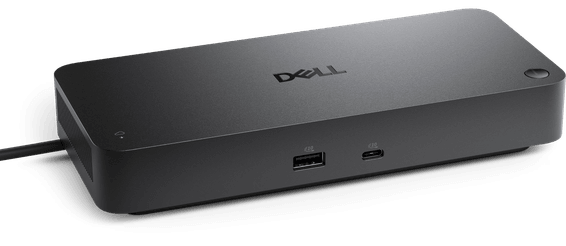
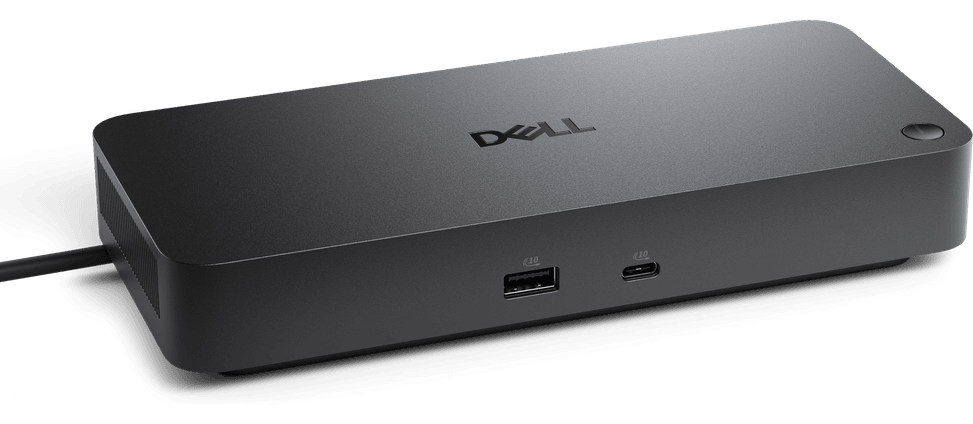
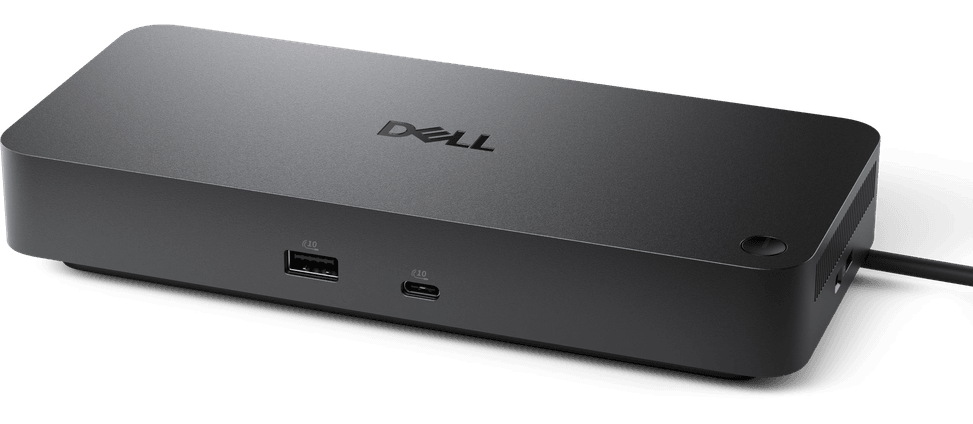
Dell Pro Docking Station - WD25

Wired networking at 2.5 Gbps, four WQHD monitors or a single 6K and transfers at 10 Gbps all arrive down one cable, which charges the laptop up to 100 W at the same time.

  • Up to 4 WQHD monitors (3440 x 1440) at 60 Hz
  • 1 6K monitor or 2 5K monitors at 60 Hz
  • 2 DisplayPort 1.4 ports and 1 HDMI 2.1 port
  • 4 USB-A 3.2 Gen 2 ports and 2 USB-C 3.2 Gen 2 ports
  • 100 W charging on Dell systems, 96 W on other brands
  • USB transfers up to 10 Gbps
  • RJ45 Ethernet port at 2.5 Gbps
  • Windows 10 and 11, macOS, ChromeOS, Ubuntu and Red Hat
Ref.: DL-WD25
2 799,00 DHincl. VAT

Out of stock

Under Law 09-08, you have the right to access, rectify and object to the processing of your personal data. This processing has been authorised by the CNDP under no. D-CE-389/2015. Learn more

Can’t wait?

Ask for an alternative on WhatsApp

Quick reply

Product overview

Discover the Dell Pro Dock - WD25, the ideal tool for optimal connectivity and greater productivity. With 100 W of power for Dell systems and an impressive video resolution of up to 6K, this dock lets you connect several displays and peripherals at the same time. Enjoy high transfer speeds through its USB-C and USB-A ports, and stay connected with its 2.5GbE Ethernet port. Compatible with a range of operating systems, the WD25 is designed to adapt to all your business needs while making management of your host PC simpler. Transform your workspace with this versatile, high-performance docking station.

See all the specifications ↓
Request a quoteShare:

Technical specifications

Technical specifications
Memory card readerNone
Ethernet network card1 x RJ-45 2.5 Gbps
Dimensions (W x D x H)90 x 35.25 x 205 mm
Net weight550 g
Compatible operating systemsWindows 10, Windows 11, macOS, ChromeOS, Ubuntu and Red Hat
Computer interfaceUSB Type-C
Maximum supported resolution1 x 6K (6144 x 3456) display at 60 Hz, or 2 x 5K displays, or 4 x WQHD (3440 x 1440) displays at 60 Hz
HDMI output1 x HDMI 2.1
Video portsHDMI, DisplayPort
DisplayPort output2 x DisplayPort 1.4
Technical specifications (continued)
ConnectivityUSB-A, USB-C, RJ45
Audio jackNone
USB-C ports2 x USB-C 10 Gbps (USB 3.2 Gen 2), one of them multifunction with video output
USB-A ports4 x USB-A 10 Gbps (USB 3.2 Gen 2)
Data rate10 Gbps (USB 3.2 Gen 2)
Computer connectionUSB-C
Docking station or hubDocking station
Supported external displays4 displays
Laptop charging100 W on Dell systems, 96 W on other brands
Warranty1 year

Specific references

EAN5397184961735
MPN210-BRFQ

Customer reviews

No reviews yet

Be the first to review this product and help other customers.

Write a review
Your rating
5/5

Shown publicly with your review.

Never published — a confirmation email will be sent to you.

Tell us about the product — in a few lines:

  • what you liked in everyday use;
  • the quality and performance you found;
  • who you would recommend it to, and why.

A question about an order, a delivery or a payment? Write to us and we will reply to you directly.

Under Law 09-08, you have the right to access, rectify and object to the processing of your personal data. This processing has been authorised by the CNDP under no. D-CE-389/2015. Learn more

Frequently asked questions about this product

How many displays does this Dell WD25 dock drive?
Up to four, depending on the resolution: 4 WQHD 3440 × 1440 displays at 60 Hz, 2 5K displays or 1 6K display (6144 × 3456) at 60 Hz. The higher the resolution, the fewer the displays.
How much power does the Dell Pro WD25 deliver to my laptop?
100 W on a Dell system, 96 W on another brand. The difference is due to Dell's proprietary protocol; on a laptop from another brand, count on 96 W.
What video connectors does this WD25 have?
Two DisplayPort 1.4, one HDMI 2.1 and one multifunction USB-C 3.2 Gen 2 port. The dedicated outputs are therefore joined by a fourth video path via USB-C.
Is this Dell dock's network port Gigabit?
Better: it runs at 2.5 Gbps, two and a half times the throughput of a Gigabit port. The switch at the other end still has to keep up, otherwise the link drops back to 1 Gbps.
How fast do the WD25's USB ports transfer data?
Up to 10 Gbps, on four USB-A 3.2 Gen 2 ports and two USB-C 3.2 Gen 2 ports. Second generation doubles the throughput of the first.
Does this Dell WD25 dock work with a Mac?
Yes: the supported systems are Windows 10 and 11, macOS, ChromeOS, Ubuntu and Red Hat. It is one of the most open docks in this category.
How much space does the Dell Pro WD25 take up on a desk?
205 × 90 × 35.25 mm, weighing 550 g. This vertical format stands on its edge against a monitor or a drawer unit, without taking up the usable surface of the workstation.
Is this Dell Pro WD25 docking station new?
Yes, it is a new Dell dock, reference WD25 from the Pro range. The invoice serves as the warranty document.

Trending

View the Dell archive

Chat on WhatsApp

Scan with my phone

The simplest way: open your phone camera and point it at this code. The chat opens with your message ready.

Open WhatsApp Web

Works if your phone is already linked to this computer.