Welcome to the new iris.ma

We rebuilt everything for you

Same team, same standards

Pay nowView my order
Visit the Huawei store

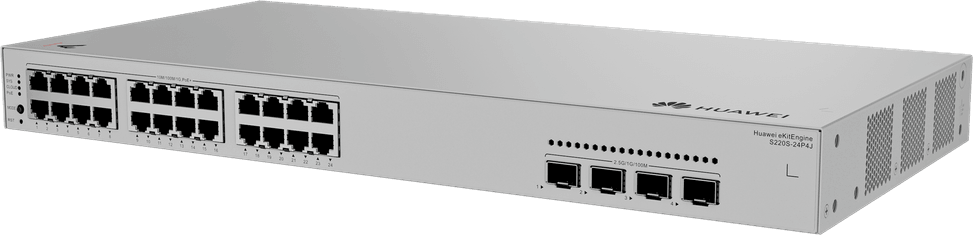
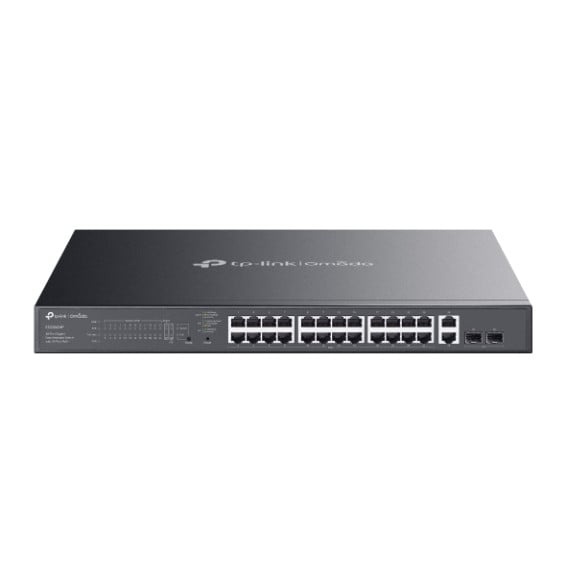
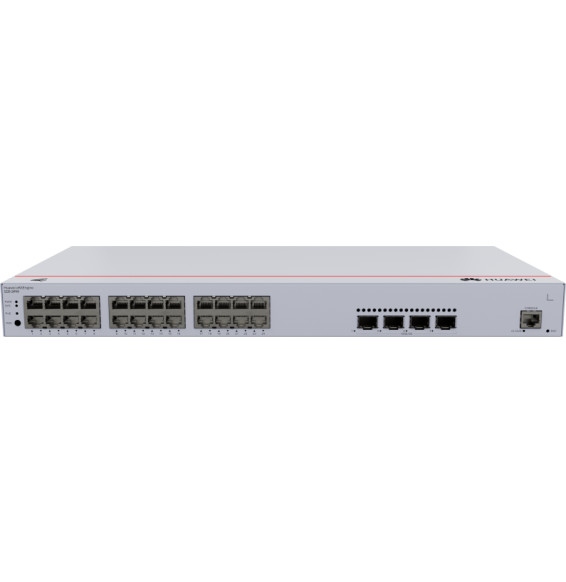
Huawei eKitEngine S220S-24P4J 24-Port Switch (98012516)

Managed switch that powers up to 24 devices (cameras, Wi-Fi access points, IP phones) over the network cable, with a 400 W PoE+ budget. Uplinks at 2.5 Gbps for recent access points.

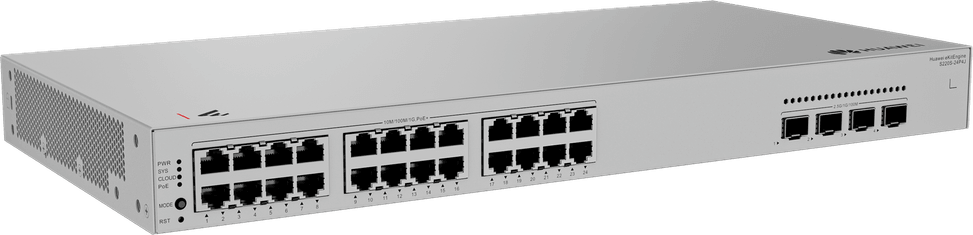
  • 24 Gigabit RJ45 PoE+ ports (802.3at)
  • 400 W PoE+ budget
  • 4 SFP 2.5 Gbps ports for uplinks
  • L2 managed — VLAN, QoS, security (DHCP snooping, anti-DoS)
  • Management through the HUAWEI eKit App, web interface or SNC
  • Perpetual PoE — power maintained through reboots
  • 1U rack-mountable format
  • Switching capacity 68 Gbps
Ref.: 98012516
2 929,00 DHincl. VAT

Configuration · Huawei eKitEngine S220S

In stock

Earn 30 DH in loyalty credit with this purchaseHow does it work?Loyalty credit capped at 300 DH per order.

Receive it between Wed 23 Sept and Fri 25 Sept — delivery 40 DH incl. VAT all over Morocco

Delivery to your address

Receive it between Wed 23 Sept and Fri 25 Sept — delivery 40 DH incl. VAT all over Morocco

The estimate is refined using actual delivery rounds to your city.

  • Free delivery from 3 000 DH of purchases, all over Morocco.
  • Below that, the same rate in every city for parcels up to 30 kg (delivery to your home or workplace) — the exact amount is shown above, then in the basket.
  • Above 30 kg, the rate follows the parcel's weight. In Casablanca, the flat rate holds up to 120 kg.
  • You are notified by SMS, then called by the courier before your parcel is handed over (delivered by Sapress).
  • Observed delivery time: 1 to 5 working days depending on the city.
Free in-store collection: Casablanca (within 24 h) · Témara (within 48 h)

In-store collection — free

Casablanca store
We bring it to the store within 24 h
We call you as soon as it arrives in store.

Résidence Manoir des Roses, Lot. 18, Boulevard El Hachmi El Filali, Rond-point Bachkou, Casablanca

Opening hours

  • Mon–Fri: 10am – 7pm
  • Sat: 10am – 2pm
  • Closed on Sundays and public holidays

Payment on site: cash, bank card via terminal, certified cheque.

View the map on Google Maps

Temara pickup point
We bring it to the store within 48 h
We call you as soon as it arrives in store.

Boulevard Hassan II, Résidence Les Perles de Témara, Immeuble 5, appartement 2, Témara

Opening hours

  • Mon–Fri: 8.30am – 1pm / 2pm – 6pm
  • Sat: 8.30am – 12.30pm
  • Closed on Sundays and public holidays

Payment on site: cash, bank card via terminal, certified cheque.

View the map on Google Maps

1 year warranty — free repair in Morocco if it breaks down during the warranty period

1 year manufacturer's warranty

This product is covered for 1 year by a manufacturer's warranty (the brand's official warranty). Your iris.ma invoice serves as the warranty document: keep it safe.

A problem with your product? Don't worry: contact us by phone, WhatsApp or e-mail. Depending on the brand, we direct you either straight to the repairer appointed by the brand to fix your product, or to us — and we take care of the rest.

  • If a repair is possible, it is carried out free of charge.
  • If the product cannot be repaired, the brand offers an exchange for another product.
  • If no product is available, a refund is issued as soon as the brand confirms it.

Faulty straight out of the box? Some brands offer an immediate exchange, others a repair. Contact us to find out what applies to your product.

The warranty covers breakdowns occurring under normal use, as defined by the brand's terms. Product breakage (drop, impact, liquid…) is not covered, nor are certain consumable parts.

New, never opened — our commitment

All our products are new, delivered in their sealed original packaging.

We commit to never sending you a product that has been opened, unboxed or returned by another customer — even one “just opened for checking”.

Any doubt on delivery (damaged box, seal already opened)? Point it out to the courier or contact us immediately: we take the product back and send you another one.

Sales invoice

Every order comes with its sales invoice, included with the parcel (handed over in person for a store collection).

Ordering for a company? Using the details you give at checkout (company name and ICE), the invoice is issued in your company's name, with its ICE.

Need a quote? Request a free quote — reply within 24 working hours.

100% secure payment: Bank transfer · Bank card · Cash on delivery · Certified cheque

Accepted payment methods

Bank transfer

Simply transfer the amount shown to account 007 826 0002684000000426 89 — SGM2I, Attijariwafa bank. The rest (the reference to quote, sending us the proof, tracking) is explained right after confirmation and by email. An instant transfer is recommended: it saves you 24 hours on the delivery time.

Bank card

Your everyday Moroccan bank card is enough — Visa, Mastercard or CMI, no special card required. Foreign cards are accepted too. Secure payment by Attijari Payment.

Cash on delivery

Pay the courier in cash on delivery — no fee.

Certified cheque

Certified cheque payable to “sgm2i”. Have your bank certify the cheque, then send us a copy on WhatsApp (+212 6 64 10 46 24) or to service.client@iris.ma — we dispatch as soon as we receive it.

Cash at a bank branch

Pay the cash in at any of the 3,400 Attijariwafa Bank branches in Morocco, to the SGM2I account no. 0268 D 000 000 426. You do not need an account there: your ID and the cash are enough.

The methods offered depend on the order total and the carrier — checkout shows the final list.

Google reviews4.7(553 reviews)
Manufacturer's datasheetView the PDF · 1,1 Mo — downloadable

Product overview

Huawei eKitEngine S220S-24P4J managed switch: 24 Gigabit PoE+ ports and 4 x 2.5GE SFP fibre ports to power IP cameras, Wi-Fi access points and phones over the network cable, with full L2 management.
PoE+: the 24 x 10/100/1000BASE-T PoE+ ports deliver a total budget of 400 W — power a large installation of cameras or Wi-Fi access points at the same time with no extra electrical wiring; perpetual PoE keeps power flowing even during updates.
Uplinks: 4 x 2.5GE SFP ports (fibre) for Multi-Gigabit interconnections to aggregation switches.
Management: L2 managed, via the HUAWEI eKit App, web interface or SNC; VLAN, QoS, security (DHCP snooping, anti-DoS, 802.1X), LACP.
Also: capacity 68 Gbps, throughput 51 Mpps, 16K MAC table, 1U form factor, smart cooling, ERPS.

See all the specifications ↓
Request a quote

Be notified of a price drop

Share:

Technical specifications

Technical specifications
MAC table size16,000 entries
Number of VLANs4,094 VLANs
Interfaces24 x 10/100/1000BASE-T PoE+ ports, 4 SFP 2.5GE ports
PoE ports24 PoE+ ports
Total PoE budget400 W
Network standardsIEEE 802.1d, 802.1w, 802.1s, 802.3az, ITU-T G.8032
Switching capacity68 Gbps
Forwarding rate51 Mpps
Management modesWeb interface, HUAWEI eKit app, SNC platform
Cloud management platformHUAWEI eKit (cloud management)
Layer 2 featuresSTP, RSTP, MSTP, ERPS (G.8032), IGMP snooping v1/v2/v3, LACP aggregation, storm control
IP routingNone
Quality of service (QoS)Per-interface rate limiting, IPv4 ACLs, 8 queues per interface, packet filtering
Dimensions (W x D x H)442 x 220 x 43.6 mm
Number of ports19 to 28 ports
Technical specifications (continued)
ManagedYes
Security featuresDefence against DoS, ARP and ICMP attacks, DHCP snooping, secure boot
Power supplyInternal AC power supply 100-240 V AC, 50/60 Hz
Cooling systemVariable-speed fans
Operating temperature-5 to 40 °C from 0 to 1,800 m altitude
Operating humidity5 to 95% RH, non-condensing
PoE powerYes
Port speed2.5 Gbps (Multi-Gig)
Management levelLayer 2
PoE standardPoE+ (802.3at, up to 30 W/port)
PoE budget251 to 400 W
Fibre slots (SFP)Yes
Mounting19-inch rack-mountable
Warranty1 year

Customer reviews

No reviews yet

Be the first to review this product and help other customers.

Write a review
Your rating
5/5

Shown publicly with your review.

Never published — a confirmation email will be sent to you.

Tell us about the product — in a few lines:

  • what you liked in everyday use;
  • the quality and performance you found;
  • who you would recommend it to, and why.

A question about an order, a delivery or a payment? Write to us and we will reply to you directly.

Under Law 09-08, you have the right to access, rectify and object to the processing of your personal data. This processing has been authorised by the CNDP under no. D-CE-389/2015. Learn more

Frequently asked questions about this product

What is special about the uplinks on the S220S-24P4J?
Its four SFP slots run at 2.5 Gbps, not Gigabit: an intermediate speed suited to recent Wi-Fi access points and to links between floors, which avoids under-sizing the uplink of a 24-port access switch. The optical modules are chosen according to the distance.
How many devices can the 400 W of PoE+ power?
400 W for the 24 ports, each able to deliver up to 30 W under 802.3at. Twenty-four cameras at 12 W stay below 300 W; around fifteen power-hungry Wi-Fi access points, on the other hand, are enough to exhaust the budget. The calculation is based on actual consumption, never on 24 × 30 W.
Is power to the cameras cut during a restart?
No. Perpetual PoE keeps power on the ports while the switch restarts, including during a software update. This model is also on the list of models that support Fast PoE, which restores power even before the boot process has finished.
How many VLANs can be created on this switch?
4,094 VLANs, with a table of 16,000 MAC addresses — static, dynamic or blackhole to keep out a specific machine. Address learning and ageing follow the IEEE 802.1d standard, with no intervention needed.
What does this switch offer against a link failure in a ring?
The ERPS protocol, standardised as ITU-T G.8032, restores traffic within a few milliseconds when a link in the ring goes down. STP, RSTP and MSTP cover conventional topologies, and LACP aggregation balances the load across several links while providing failover if one breaks.
How do you prioritise voice and limit a port's bandwidth?
Each interface has eight queues, rate limiting on both transmit and receive, per-port traffic policing and IPv4 access control lists with packet filtering. Enough to reserve bandwidth for telephony and throttle an overly chatty computer.
What protections does this switch put up against internal attacks?
Defence against denial-of-service, ARP and ICMP attacks, secure boot, port isolation, blackhole MAC addresses, AAA authentication, CPU protection and DHCP snooping — which keeps a binding table and rejects any packet not listed in it, as well as any unauthorised DHCP server.
How is the S220S-24P4J managed once installed?
Through the HUAWEI eKit app, in cloud or local mode, through the web interface, over SSH v2.0 or over HTTPS. Monitoring reports system logs and prioritised alarms, the LLDP protocol discovers neighbouring devices and port mirroring sends traffic to an analyser.
Does this model have a fan, and in what conditions does it operate?
Cooling is active, with smart fan speed control: it belongs in a rack cabinet or a comms room, not on a desk. It runs continuously from -5 to +40 °C up to an altitude of 1,800 m, with 5 to 95 % humidity, non-condensing.
Do you need an external power supply unit?
No, the power module is built into the chassis: a power cord is all it takes. The input accepts 100 to 240 V at 50/60 Hz, and up to 290 V as maximum input voltage, or a high-voltage DC power supply. The chassis measures 442 × 220 × 43.6 mm, i.e. 1U in a 19-inch rack.
What internal performance does this switch deliver?
68 Gbps of switching capacity and 51 Mpps forwarding rate. IGMP v1, v2 and v3 snooping directs multicast streams only to the ports concerned, and storm control prevents a broadcast burst from saturating the 24 access ports.
Is the switch new, and where can I view its datasheet?
Yes, new equipment, with the invoice serving as the warranty document. The manufacturer's document covers the entire eKitEngine S220S series and lets you compare this model with the others: datasheet (PDF).

Trending

View the Huawei archive

Chat on WhatsApp

Scan with my phone

The simplest way: open your phone camera and point it at this code. The chat opens with your message ready.

Open WhatsApp Web

Works if your phone is already linked to this computer.

Prefer to call? (+212) 05 30 31 64 21