
Welcome to the new iris.ma

We rebuilt everything for you

Same team, same standards

Pay nowView my order
Visit the Grandstream store

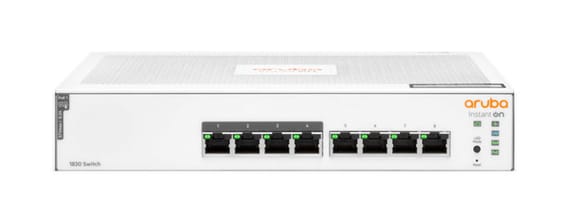
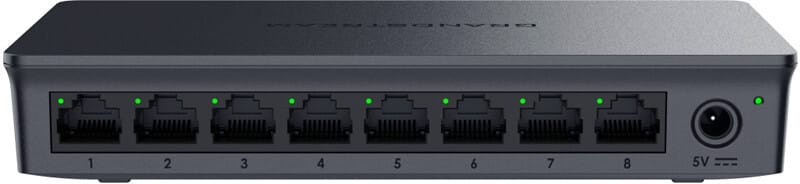
Grandstream GWN7711 Layer 2 Managed Switch - 8 Gigabit Ports

Ultra-compact format designed for hotels, small offices and SMEs: segment and control your network simply through a web interface or GWN.Cloud, with built-in loop detection and cable testing.

  • Switching capacity 16 Gbps, throughput 11.9 Mpps
  • L2 management through a web interface or GWN.Cloud
  • Built-in loop detection, port mirroring and cable testing
  • 4K VLAN (IEEE 802.1Q), QoS (802.1p, DSCP)
  • Ultra-compact format, desk or wall, fanless
  • 4 link aggregation groups (LAG)
  • IGMP snooping, broadcast storm control
  • 8K MAC address table
Ref.: GWN7711
285,00 DHincl. VAT

Out of stock

Under Law 09-08, you have the right to access, rectify and object to the processing of your personal data. This processing has been authorised by the CNDP under no. D-CE-389/2015. Learn more

Can’t wait?

Ask for an alternative on WhatsApp

Quick reply

Manufacturer's datasheetView the PDF · 587 Ko — downloadable

Product overview

Grandstream GWN7711 Layer 2 managed switch: 8 Gigabit ports in an ultra-compact format, designed for hotels, small offices and SMEs that want to segment and control their network simply.
Ports & performance: 8 Gigabit RJ45 ports (10/100/1000 Mbit/s); 16 Gbit/s switching capacity, 11.9 Mpps throughput, 8K MAC table.
Management: L2, configurable via web interface or managed in the cloud through GWN.Cloud; 4K VLANs (IEEE 802.1Q), QoS (802.1p, DSCP), loop detection, port mirroring and cable testing to pinpoint network faults.
Form factor & installation: compact, desktop or wall-mounted, fanless and completely silent operation.
Also: 4 link aggregation groups (LAG), IGMP snooping, broadcast storm control, MAC filtering, VLAN isolation, configuration backup and restore, 4 MB buffer memory, jumbo frames up to 12 KB.

See all the specifications ↓
Request a quoteShare:

Technical specifications

Technical specifications
MAC table size8,000 entries
Number of VLANs4,094 VLANs (802.1Q) and port-based VLAN
Interfaces8 Gigabit Ethernet ports
PoE portsNone
Total PoE budgetNone
Network standardsIEEE 802.3i, 802.3u, 802.3ab, 802.3x, 802.3af, 802.3at, 802.1p
Switching capacity16 Gbps
Forwarding rate11.9 Mpps
Packet buffer4 Mbit
Management modesLocal web interface and GWN.Cloud
Cloud management platformGWN.Cloud
Layer 2 features802.1Q VLAN and port-based VLAN, 4 link aggregation groups, IGMP snooping, loop prevention, port mirroring
IP routingNone
Quality of service (QoS)Automatic ingress port priority, priority mapping, SP, WRR and WFQ scheduling, port-based priority, 802.1p and DSCP, bandwidth control, rate limit
Technical specifications (continued)
Weight0.17 kg
Dimensions (W x D x H)164 x 80 x 30 mm
Package contentsSwitch, quick installation guide, AC adapter
Number of ports6 to 10 ports
ManagedYes
Security featuresBroadcast storm control, port-based VLAN isolation, MAC address filtering, Kensington security slot
Power supplyExternal AC adapter 5 V DC, 0.6 A
Cooling systemFanless
PoE powerNo
Port speed1 Gbps (Gigabit)
Management levelLayer 2
Fibre slots (SFP)No
MountingDesktop
Warranty1 year

Specific references

EAN6947273704928

Customer reviews

No reviews yet

Be the first to review this product and help other customers.

Write a review
Your rating
5/5

Shown publicly with your review.

Never published — a confirmation email will be sent to you.

Tell us about the product — in a few lines:

  • what you liked in everyday use;
  • the quality and performance you found;
  • who you would recommend it to, and why.

A question about an order, a delivery or a payment? Write to us and we will reply to you directly.

Under Law 09-08, you have the right to access, rectify and object to the processing of your personal data. This processing has been authorised by the CNDP under no. D-CE-389/2015. Learn more

Frequently asked questions about this product

Does the GWN7711 power devices over PoE?
No: this is the non-PoE version of the series. Its 8 Gigabit ports carry data only. The GWN7711P, its twin, powers four ports at up to 30 W within a 60 W budget, and even supports a 24 V passive mode for older cameras.
How do you segment a small network with this switch?
With VLANs: up to 4,000, in port mode or with IEEE 802.1Q tagging. The manufacturer gives the example of a hotel or a small business where cameras, Internet and telephony are isolated from one another on the same 8-port unit.
How do you locate a network fault from this switch?
Three built-in tools: loop detection, cable testing and port mirroring, complemented by per-port statistics and a ping watchdog. Enough to locate a damaged cable or a loop without bringing out test equipment.
How many links can you aggregate on this 8-port model?
Four aggregation groups: two ports combined towards the router or the main switch double the uplink bandwidth and keep the connection up if a cable fails. The manufacturer even presents this as a typical use case for ports 7 and 8.
How do you prioritise voice on this switch?
Through quality of service: port-based, 802.1p or DSCP priority, with SP, WRR or WFQ queue scheduling, bandwidth control and rate limiting. In parallel, IGMP snooping prevents multicast from flooding the 8 ports.
How is this switch powered, and where should it be installed?
By an external 5 V, 0.6 A power adapter, supplied with the switch and the quick start guide. The 164 × 80 × 30 mm plastic casing, weighing 170 grams, sits on a desk or mounts on a wall, and is fanless and therefore silent.
What protections does this small switch provide?
Broadcast storm control, port-based VLAN isolation, MAC address filtering and a Kensington security slot to physically secure the unit — useful in a hotel lobby or an accessible room.
What internal performance does this 8-port model offer?
16 Gbps of switching capacity and 11.9 Mpps, with an 8,000-entry MAC address table. That is line rate on all eight Gigabit ports — more than enough for a small office, a hotel lobby or a meeting room.
How is this switch managed day to day?
Through the local web interface or GWN.Cloud, as you prefer. Routine operations are covered: configuration backup and restore, reboot, factory reset and firmware upgrade.
Is the switch new, and where can you find its datasheet?
Yes, new equipment, with the invoice serving as the warranty document. The manufacturer's document covers the GWN7711 series, its VLAN features and its deployment scenarios in hotels and small businesses: datasheet (PDF).

Trending

View the Grandstream archive

Chat on WhatsApp

Scan with my phone

The simplest way: open your phone camera and point it at this code. The chat opens with your message ready.

Open WhatsApp Web

Works if your phone is already linked to this computer.

Prefer to call? (+212) 05 30 31 64 21