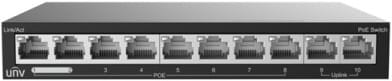
Connects and powers up to 24 IP cameras and video surveillance devices over a single cable (Fast Ethernet PoE, 802.3af/at standard). Two Gigabit uplinks to the rest of the network.
24 Fast Ethernet PoE ports (10/100 Mbps, RJ45)
802.3af/at PoE standard to power IP cameras and video surveillance devices
2 Gigabit uplinks (1 RJ45 port + 1 combo port)
8.8 Gbps switching capacity
48/51 V DC power supply
Ref.: NSW2020-24T1GT1GC-PO
New
Out of stock
1/3
1 659,00 DHincl. VAT
Out of stock
Product overview
The NSW2020-24T1GT1GC-PO is a 24-port Uniview network switch for connecting and powering the IP cameras and other devices of a video surveillance system.
Number of ports: 24
PoE: Yes
Product type: Network switch
Ports: 24×100Mbps PoE ports (RJ45) + 1×1000Mbps Gigabit Ethernet port + 1×1000Mbps combo port
24 x RJ45 100 Mbps PoE ports, 1 x Gigabit port, 1 x Gigabit combo port
PoE ports
24 PoE ports (802.3af/at)
Network standards
IEEE 802.3af, 802.3at
Switching capacity
8.8 Gbps
Weight
2.15 kg
Number of ports
19 to 28 ports
Managed
No
Technical specifications (continued)
Power supply
48 or 51 V DC power supply
PoE power
Yes
Port speed
1 Gbps (Gigabit)
PoE standard
PoE+ (802.3at, up to 30 W/port)
Fibre slots (SFP)
No
Mounting
19-inch rack-mountable
Warranty
1 year
Customer reviews
No reviews yet
Be the first to review this product and help other customers.
Write a review
Frequently asked questions about this product
Are the 24 PoE ports on this UNV switch Gigabit?
No: the 24 PoE ports run at 100 Mbps. Only the two uplinks are Gigabit — one RJ45 port and one combo port. This is the point to check before connecting 4K cameras: 100 Mbps is enough for several streams, but the port will not go any faster.
Which cable pairs does this switch use to deliver PoE?
On pairs 4/5 and 7/8, under 802.3af and 802.3at: power travels over the spare pairs of a Fast Ethernet cable, not over the data pairs. Properly terminated four-pair cabling is therefore essential, even for a 100 Mbps link.
How is this switch powered?
By 48 or 51 V direct current, from a dedicated power supply unit: make sure you have room for it and a power socket nearby. The chassis weighs 2.15 kg and operates from 0 to 40 °C, which suits a comms room without air conditioning.
What switching capacity does this model claim?
8.8 Gbps, which corresponds to 24 ports at 100 Mbps and two Gigabit uplinks running at the same time. This sizing matches its purpose: connecting and powering a fleet of cameras, not carrying heavy file transfers.
What is the combo uplink port for?
It works over copper or fibre, as you choose: the RJ45 port and the optical slot share the same link. This is what lets you connect the camera room to the main building over fibre when the distance exceeds the 100 metres of copper.
Is the switch new and covered by a warranty?
Yes, new equipment, with the invoice serving as the warranty document. This is the Uniview NSW2020-24T1GT1GC-PO, a PoE switch designed for connecting the IP cameras of a video surveillance system.
For SMEs, hotels or schools: two uplink speeds to choose from, 2.5G or 10G fibre, to interconnect your access switches. Completely silent 1U casing, fanless.
Each PoE+ port delivers up to 30 W, for a total budget of 120 W, rounded out by two fibre links. Managed from the GWN.Cloud platform or locally, with VLANs and advanced security.
•8 PoE+ ports (802.3af/at), total budget 120 W, up to 30 W per port
For SMEs, hotels, schools or industrial sites: 4 fibre links beyond standard Gigabit to connect your aggregation switches. Completely silent 1U casing, managed locally or from the cloud.
Designed for SMEs and video surveillance: automatic IP camera recognition, loop prevention and remote port restart through Ruijie Cloud. Extension up to 250 m in camera mode.
Extend a SOHO or retail network with ease: power IP cameras, Wi-Fi access points and IP phones straight through the network cable, with no mains socket and no configuration.
Rack-mountable Easy Smart switch for an SME that wants to segment and secure its network with VLANs and QoS, without the complexity of a fully managed switch — configurable from a simple web interface.
•802.1Q VLANs, port-based and MTU (up to 128 simultaneous VLANs)
1 Gigabit SFP slot on top of PoE+, for a dedicated fibre link. 63 W PoE budget with automatic device recovery, and extend mode reaching up to 250 m for video surveillance.
Designed for video surveillance: a 384 W PoE+ budget shared across the powered ports, transmission up to 250 m and power maintained even when the switch restarts. Rackable metal housing, VLAN and automatic loop prevention.
Rack-mountable Easy Smart switch, the middle ground for an SME that wants VLANs and QoS without the complexity of a fully managed switch, through a simple web interface.
Desktop switch in a sturdy metal casing, with a web interface to prioritise traffic and create VLANs — a sound balance between simplicity and control for a small network.
L2+ management: 4K VLANs, QoS, IGMP Snooping
In stock
1 749 DHincl. VAT1 749,00 DHincl. VAT
Delivery everywhereDelivered all over Morocco
•
L2 managed (fully managed)
In stock
1 949 DHincl. VAT1 949,00 DHincl. VAT
Delivery everywhereDelivered all over Morocco
PoE+ (802.3af/at standard)
•Managed through Ruijie Cloud, a mobile app or a web interface
Layer 3 managed enterprise switch (static routing and RIP) that powers all its ports over the network cable, for cameras and Wi-Fi access points. Switching capacity 128 Gbps, upgradable to 10 Gbps fibre.
Grow a video surveillance network with no configuration at all: two uplinks avoid saturation towards the router. Fanless housing, Extend mode up to 250 m.
•Total PoE+ budget of 96 W, up to 30 W per port (802.3af/at)
•Plug-and-play operation, no configuration required
•Extend mode: data and PoE transmission up to 250 m
Designed for video surveillance: a 384 W PoE+ budget shared across the powered ports, transmission up to 250 m and power maintained even when the switch restarts. Rackable metal housing, VLAN and automatic loop prevention.
•Total PoE+ budget of 384 W, up to 30 W per port (802.3af/at)
•2 Gigabit SFP ports for a fibre link
•Fast PoE and Perpetual PoE: power maintained when the switch restarts
Aruba Instant On switch for small businesses: full L2+ managed from the mobile app, the cloud portal or a local web interface, with a more measured PoE budget for flexible deployment of Wi-Fi access points and IP cameras.
•Class 4 PoE (802.3af/at), up to 30 W per port
•Managed through the Aruba Instant On app, the cloud or the local web interface
•802.1Q VLANs, QoS, LACP link aggregation (8 trunks), IGMP Snooping
Metal housing for better heat dissipation and a longer service life, with built-in QoS to keep voice and video smooth. Plug-and-play installation, and rack-mountable too.
Unmanaged Gigabit switch, ideal for a small practice or a home office: plug it in and use it straight away, with no configuration at all. Four of its five ports power IP cameras or Wi-Fi access points over PoE+.
A managed enterprise switch that powers IP cameras, Wi-Fi access points and phones on every one of its ports, with no mains socket. Switching capacity 176 Gbps, stackable, upgradable to fibre.
Layer 2 managed switch for a small office powering a few Wi-Fi or IP devices over Power over Ethernet, with monitoring and scheduling via the Instant On mobile app.
•Layer 2 managed, configurable via the Instant On app and the web portal
•PoE+ up to 30 W per port on the 4 dedicated ports (IEEE 802.3af/at, class 4)