Welcome to the new iris.ma

We rebuilt everything for you

Same team, same standards

Pay nowView my order
Visit the Grandstream store

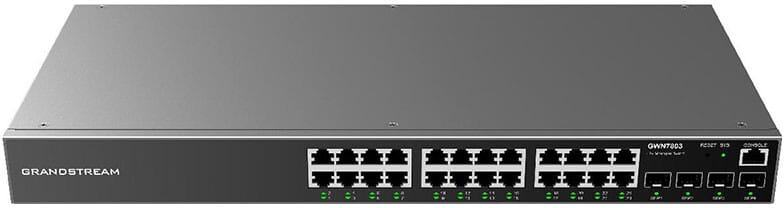
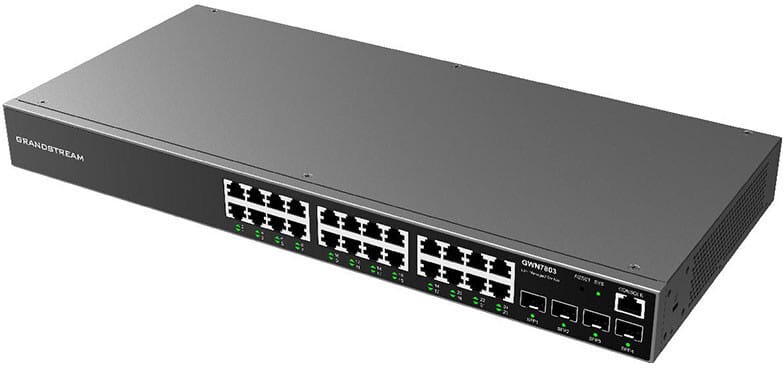
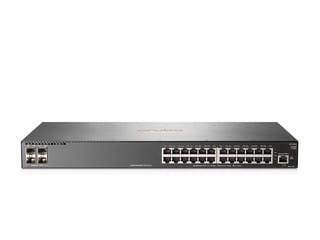
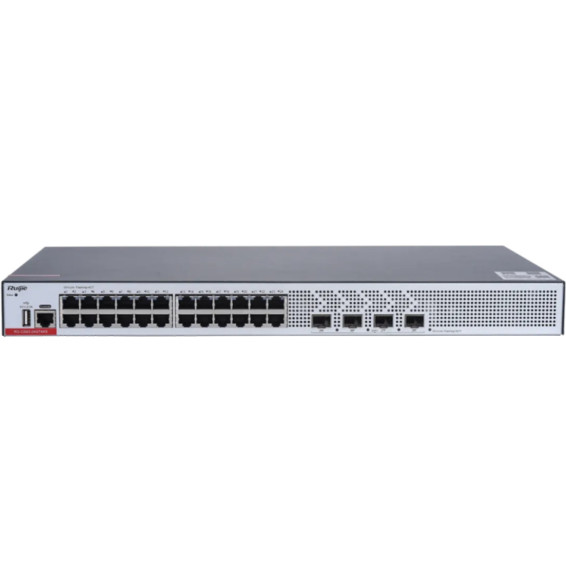
Grandstream GWN7803 Layer 2+ Managed Switch 24 Gigabit Ports + 4 SFP Ports

Designed to equip a whole floor or an SME: advanced VLAN segmentation and quality of service for voice/video traffic. 56 Gbps switching capacity, managed remotely through GWN.Cloud or GWN Manager.

  • L2+ management: advanced VLANs (802.1Q, QinQ), voice VLAN
  • QoS to prioritise voice and video, IGMP/MLD snooping
  • 56 Gbps switching capacity, 41.66 Mpps forwarding rate
  • Management through GWN.Cloud or GWN Manager, web/CLI/SNMP interface
  • 19" rack-mountable (kits included), desk or wall mounting also possible
  • 8K MAC address table, 4K VLAN
  • 8 link aggregation groups, STP/RSTP/MSTP
  • Advanced security: 802.1X, RADIUS/TACACS+, IP Source Guard, ARP inspection
Ref.: GWN7803
2 239,00 DHincl. VAT

Configuration · Grandstream GWN7800

Out of stock

Under Law 09-08, you have the right to access, rectify and object to the processing of your personal data. This processing has been authorised by the CNDP under no. D-CE-389/2015. Learn more

Can’t wait?

Ask for an alternative on WhatsApp

Quick reply

Manufacturer's datasheetView the PDF · 611 Ko — downloadable

Product overview

Grandstream GWN7803 Layer 2+ managed switch: 24 Gigabit ports and 4 × 1 Gbit/s fibre SFP ports to equip an entire floor or SME with a single powerful, versatile managed switch.
Ports: 24 Gigabit RJ45 ports (10/100/1000 Mbit/s) and 4 Gigabit SFP ports for fibre links to other buildings or switches — 56 Gbit/s switching capacity, 41.66 Mpps throughput.
L2+ management: advanced VLANs (IEEE 802.1Q, QinQ, voice VLAN), QoS for voice and video, IGMP/MLD snooping, static routing; web interface, CLI, SNMP; managed through GWN.Cloud or GWN Manager.
Form factor: 19" rack-mountable (kits included), desktop or wall mounting also possible.
Also: 8K MAC table, 4K VLANs, 8 link aggregation groups, STP/RSTP/MSTP, 802.1X, RADIUS, TACACS+, IP Source Guard, ARP inspection, DHCP snooping, storm control, IPv4/IPv6.

See all the specifications ↓
Request a quoteShare:

Technical specifications

Technical specifications
MAC table size8,000 entries
Number of VLANs4,094 VLANs (802.1Q), port-based VLAN and voice VLAN
Interfaces24 Gigabit Ethernet ports, 4 Gigabit SFP ports, 1 console port
PoE portsNone
Total PoE budgetNone
Network standardsIEEE 802.3, 802.3i, 802.3u, 802.3ab, 802.3z, 802.3x, 802.3af/at, 802.1p, 802.1Q, 802.1w, 802.1d, 802.1s
Switching capacity56 Gbps
Forwarding rate41.66 Mpps
Packet buffer4.1 Mbit
Management modesWeb interface, SNMP, RMON, SSH, Telnet, HTTPS, syslog
Cloud management platformGWN.Cloud (GDMS Networking) and GWN Manager
Layer 2 features802.1Q VLAN, 8 link aggregation groups, STP/RSTP/MSTP (64 instances), IGMP and MLD snooping, MVR
IP routingACL-based unicast routing, DHCP server and relay
Quality of service (QoS)Port priority, SP, WRR, WFQ, SP-WRR and SP-WFQ scheduling, rate limit, 1.5K ACLs
Technical specifications (continued)
Weight2.7 kg
Dimensions (W x D x H)440 x 200 x 44 mm
Package contentsSwitch, 1 AC cable (1.2 m, 10 A), standard rack-mount brackets, 1 grounding cable, 4 rubber feet, 2 cable lugs
Number of ports19 to 28 ports
ManagedYes
Security features802.1X, RADIUS and TACACS+, port isolation and security, IP source guard, ARP inspection, DHCP snooping
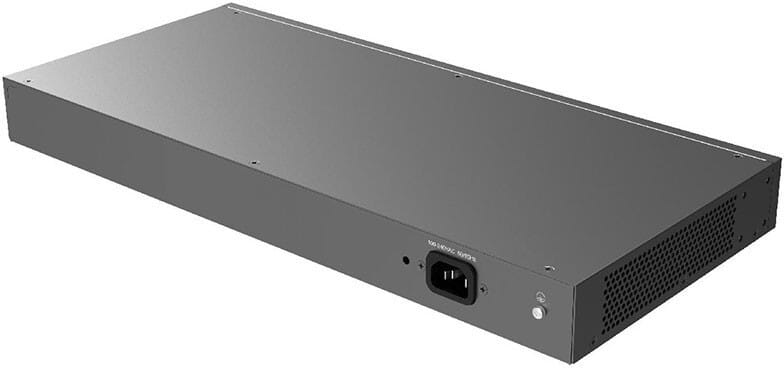
Power supplyInternal 30 W power supply, 10 A power cable included
Cooling systemFanless
PoE powerNo
Port speed1 Gbps (Gigabit)
Management levelLayer 2+
Fibre slots (SFP)Yes
Mounting19-inch rack-mountable
Warranty1 year

Customer reviews

No reviews yet

Be the first to review this product and help other customers.

Write a review
Your rating
5/5

Shown publicly with your review.

Never published — a confirmation email will be sent to you.

Tell us about the product — in a few lines:

  • what you liked in everyday use;
  • the quality and performance you found;
  • who you would recommend it to, and why.

A question about an order, a delivery or a payment? Write to us and we will reply to you directly.

Under Law 09-08, you have the right to access, rectify and object to the processing of your personal data. This processing has been authorised by the CNDP under no. D-CE-389/2015. Learn more

Frequently asked questions about this product

Does the GWN7803 power cameras and access points over PoE?
No: this is the non-PoE version of the series. Its 24 Gigabit ports carry data only. Devices that need to be powered over the network cable require an injector, or the GWN7803P model, identical but fitted with 24 PoE+ ports and a 360 W budget.
How many VLANs can you configure on the GWN7803?
4,000 VLANs, with IEEE 802.1Q tagging, port-based VLANs and voice VLAN, plus VLAN virtual interfaces. GVRP, which would propagate VLANs automatically between switches, is listed as “pending”: VLANs are still configured manually. Voice traffic is separated onto its own VLAN, with 802.1p priority.
How is this switch managed day to day?
In three ways, as you prefer: the local web interface, the GWN.Cloud platform, and GWN Manager, its version installed on your own server. The controller is built into the web interface, at no extra cost and with no subscription. Management is also available through the CLI, via console or Telnet, and through SNMP v1, v2c and v3.
What happens if a cable creates a loop on the network?
STP, RSTP and MSTP block the redundant path, with loop protection, BPDU guard and root guard. Storm control caps bursts of broadcast traffic. Port security shuts a port down as soon as the number of learned MAC addresses exceeds the set limit.
Can the switch hand out IP addresses on its own?
Yes, it has a built-in DHCP server and DHCP relay, with options 82, 60, 160 and 43, which are used to provision IP phones. DHCP snooping only accepts replies from ports declared as trusted, which neutralises a router plugged into a network outlet by mistake.
How many links can you aggregate towards the network core?
Eight aggregation groups are available: several copper or fibre ports are combined into a single logical link, which increases uplink bandwidth and keeps the link up if a cable fails. The 4 Gigabit SFP slots also handle links between buildings.
How do you restrict network access to authorised computers?
802.1X authentication, backed by RADIUS or TACACS+, checks each computer before opening its port. On top of that come four-way IP-MAC-VLAN-port binding, MAC address filtering, IP Source Guard, ARP inspection against gateway spoofing, denial-of-service protection and 1,500 access control rules.
What internal performance does this 28-port chassis offer?
56 Gbps of switching capacity, a forwarding rate of 41.66 Mpps and 28 Gbps of total non-blocking throughput, in store-and-forward mode. The MAC address table holds 8,000 entries, static or dynamic, and the packet buffer reaches 4.1 Mbit.
What is in the box, and are SFP modules included?
The box contains the switch, a 1.2 m power cord (10 A), rack-mount brackets, a grounding cable, four rubber feet and two cable lugs. SFP optical modules and RJ45 patch cords must be purchased separately, depending on the type of fibre and the distances involved.
What cabinet depth do you need for the GWN7803?
The metal casing measures 440 × 200 × 44 mm — 1U high, 20 cm deep — and weighs 2.7 kg: it fits in a shallow wall-mount cabinet. It can also sit on a desk or be mounted on a wall, and operates from 0 to 45 °C at 10 to 90% humidity, non-condensing.
What tools are available to diagnose a network fault?
Port mirroring to an analyser, ping and traceroute, a copper cable test to locate a faulty cable, syslog logging and alerts, CPU and memory monitoring, LLDP and LLDP-MED to discover neighbouring devices, and SNMP and RMON to report counters to a monitoring system.
Is the switch new, and where can you find its documentation?
Yes, new equipment, with the invoice serving as the warranty document. The manufacturer's document covers the GWN7800 series model by model — switching, security, quality of service, power: datasheet (PDF).

Trending

View the Grandstream archive

Chat on WhatsApp

Scan with my phone

The simplest way: open your phone camera and point it at this code. The chat opens with your message ready.

Open WhatsApp Web

Works if your phone is already linked to this computer.

Prefer to call? (+212) 05 30 31 64 21